Usage limits and credits
Capping AI consumption in Aimogen Pro per user, guest, role and membership plan, with a separate pool for text-to-speech.
Usage limits are the control that stops a public AI feature becoming an unbounded bill.
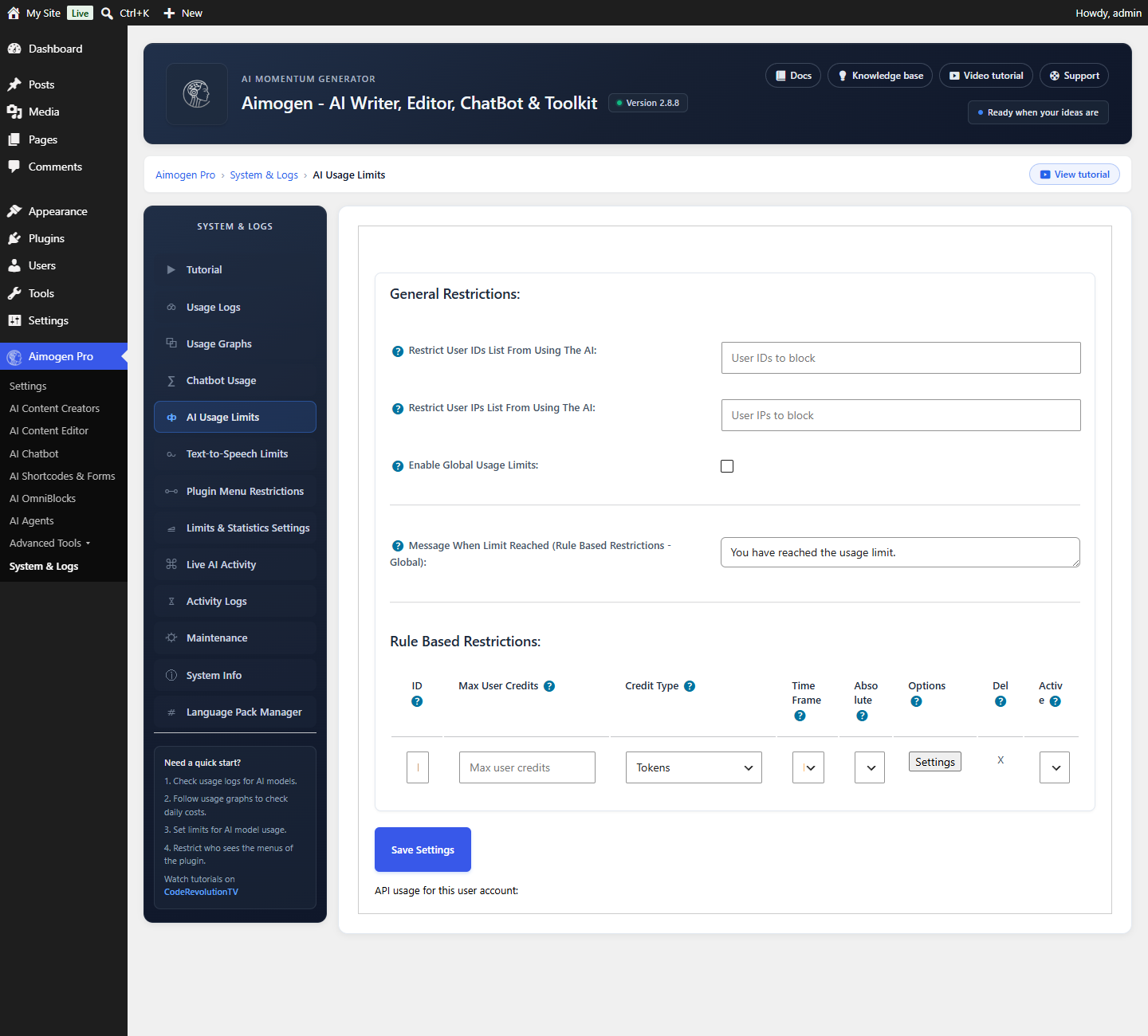
System & Logs › AI Usage Limits and Text-to-Speech Limits
Global limits#
| Setting | What it does |
|---|---|
Enable Global Usage Limits | Master switch |
Max User Credits plus credit type | The allowance for logged-in users |
Time Frame | The period it covers |
Absolute Timeframe | Absolute means "today"; relative means "the last 24 hours". The same applies to other periods |
Full Access Users | Users exempt from all limits |
Message When Limit Reached (Logged In Users) | What they see |
Max Guest Credits plus type | The allowance for visitors who are not logged in |
Time Frame (guests) | Their period |
Absolute Timeframe (guests) | As above |
Message When Limit Reached (Not Logged In Users) | What they see |
Restrict User IDs List From Using The AI | Blocked user IDs |
Restrict User IPs List From Using The AI | Blocked IPs |
Additional Roles | Roles granted access_aiomatic_menu |
Leaving a credit field blank disables that limit.
Credit types#
| Type | Counts | Suits |
|---|---|---|
queries | Requests | Simple to explain; a long request costs the same as a short one |
tokens | Tokens consumed | Fair, and close to actual cost |
price | Estimated cost | Most directly tied to spend |
For a paid service, price is usually right. For a consumer-facing allowance, queries is easiest to
communicate.
Absolute versus relative time frames#
The distinction matters more than it looks.
Absolute — a day means the calendar day. Everyone resets at midnight. Predictable, and a heavy user can exhaust their allowance in the first hour.
Relative — a day means the last 24 hours, rolling. Smoother, and harder for a user to reason about.
Absolute is easier to explain; relative is better at preventing bursts.
Rules#
Beyond the global limits, rules apply different allowances to different people. Stored in
aiomatic_Limit_Rules.
| Field | Meaning |
|---|---|
Rule Description | Your label |
User Role | A WordPress role |
Ultimate Membership Pro Subscription Plan | A UMP plan |
Restrict Content Pro Subscription Plan | An RCP plan |
Paid Memberships Pro Subscription Plan | A PMPro plan |
User ID List | Specific users |
Max User Credits plus type, Time Frame, Absolute | The allowance |
User Restricted Message | What they see |
Active | Whether the rule applies |
Membership integration is covered in Membership plugins.
Text-to-speech limits#
Speech has its own pool, configured identically. This matters because speech is billed per character and adds up much faster than people expect: a 1,500-word article is roughly 9,000 characters.
Set it separately, and set it lower than you first think.
Per-shortcode caps#
Many front-end shortcodes accept user_token_cap_per_day, a per-placement daily cap independent of the
global limits:
[aimogen-image-generator-form user_token_cap_per_day="5000"]Useful when one tool should be more constrained than the rest.
Rate limiting is separate#
Usage limits cap the total. Rate limiting caps the speed.
AI Chatbot › Limitations › Limit User Messages - Max Requests / Time Window is the rate limit. Set both: a limit of ten messages per minute is invisible to a real visitor and stops automated abuse.
Showing credits to users#
[aimogen-user-remaining-credits-text]
[aimogen-user-remaining-credits-bar]
Showing a balance makes a limit feel like a fair allowance rather than an arbitrary refusal.
IP detection#
IP-based limits and blocks depend on correct IP detection. Behind a CDN or reverse proxy, every visitor may appear to come from one address, which makes per-IP logic useless.
add_filter( 'aiomatic_get_ip', function ( $ip ) {
    if ( ! empty( $_SERVER['HTTP_CF_CONNECTING_IP'] ) ) {
        return sanitize_text_field( wp_unslash( $_SERVER['HTTP_CF_CONNECTING_IP'] ) );
    }
    return $ip;
} );
Blocking entirely#
| Goal | How |
|---|---|
| Login-only AI | Set Max Guest Credits to 0 |
| Block a user | Add their ID to Restrict User IDs List |
| Block an IP | Add it to Restrict User IPs List |
| Arbitrary logic | The aiomatic_ai_allowed filter |
Limits apply everywhere#
Every request path is covered: the chatbot, forms, shortcodes, the REST API, the PHP API and WP-CLI.
That is usually what you want. If an internal integration should not be limited, add its user to
Full Access Users.
A public-ready baseline#
Enable Global Usage Limits:      on
Max Guest Credits:               a low number, type price or queries
Time Frame:                      day
Absolute Timeframe:              on
Max User Credits:                sized to your plan
Text-to-Speech Limits:           enabled and lower
Chatbot rate limit:              10 messages per 60 seconds
Provider spend cap:              set in every provider dashboard
The provider cap is the only limit the plugin cannot bypass. Set it.
Common problems#
Limits do not apply. Enable Global Usage Limits is off, or the user is in Full Access Users.
Everyone hits the limit at once. All traffic appears as one IP. Fix IP detection.
A member is blocked with credits remaining. A global limit also applies. Both are enforced; the stricter wins.
Usage is not counted. Enable Usage Tracking is off under Settings › Statistics.
Related#
Still stuck? Open a support ticket and include the diagnostics from Aimogen Pro › System & Logs › System Info.