System Info and diagnostics
The Aimogen Pro System Info report, what it contains, and why it is the first thing to attach to a support ticket.
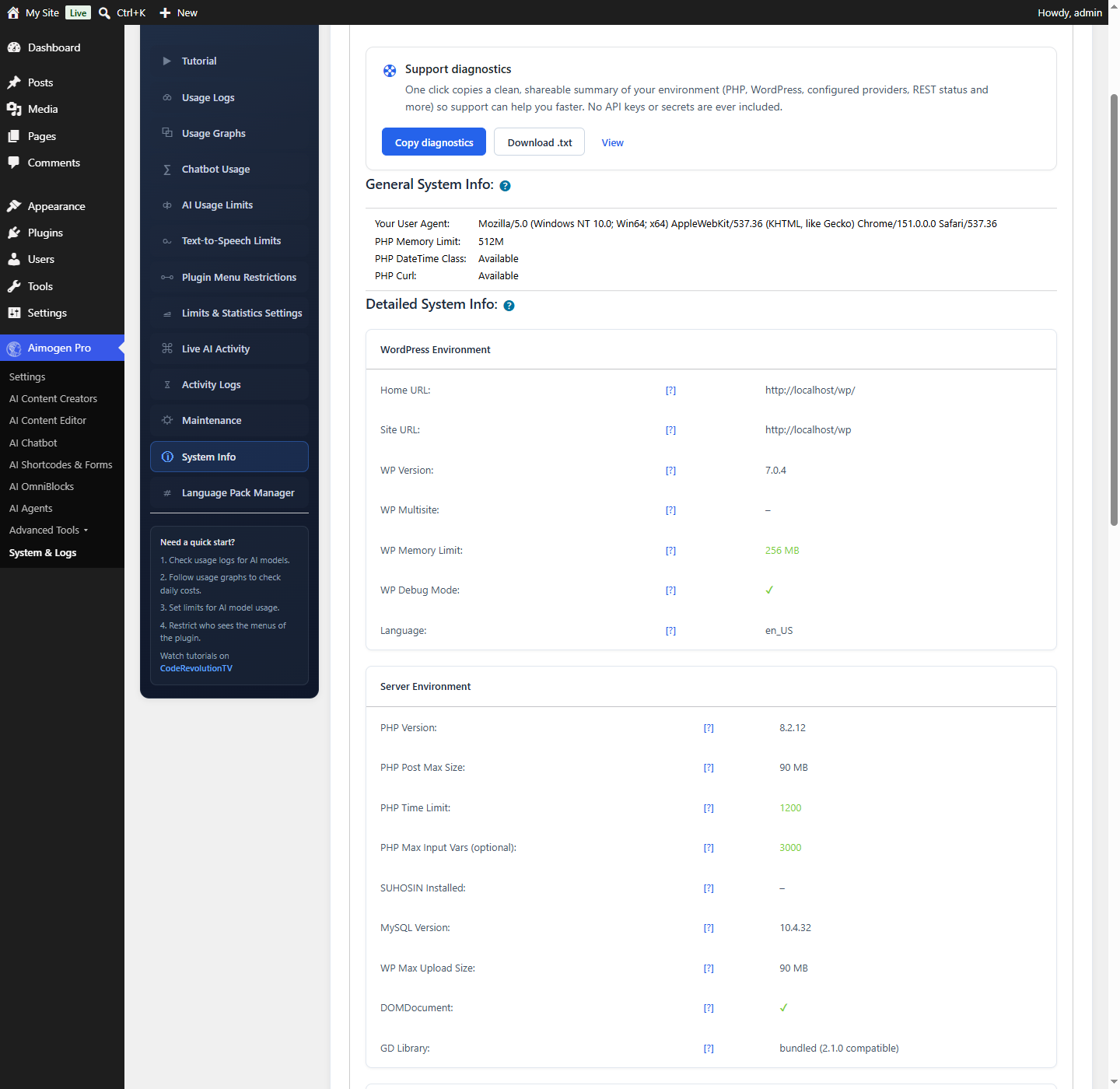
System & Logs › System Info produces a plain-text environment report. It is the single most useful thing to include in a support ticket.
What it contains#
The report is organised into sections.
[Plugin] — Aimogen Pro version, whether the free Aimogen plugin is active, the default text model, and whether usage tracking is on.
[Reliability Mode] — whether it is enabled, how many fallback models are configured, the provider scope, maximum fallback attempts, failure cooldown, whether smart API-key rotation is on, the key cooldown and quarantine durations, and details of the last recovered and last exhausted request.
[WordPress] — home and site URL, WordPress version, multisite state, locale, WP_DEBUG state and the
active theme.
[Server / PHP] — PHP version, operating system, server software and MySQL version.
[PHP limits] — memory_limit, the WordPress memory limit, max_execution_time, max_input_vars,
post_max_size, upload_max_filesize and the WordPress maximum upload size.
[PHP extensions] — cURL, OpenSSL, mbstring, dom, xml and GD.
[Connectivity] — whether remote POST and GET work, whether WP-Cron is running, the REST API base and status, whether pretty permalinks are enabled, and whether shared REST API keys are configured.
[Providers configured] — which providers have credentials.
[Active plugins] — the full list, for conflict diagnosis.
A Detailed System Info section provides more advanced information.
No secrets are included#
Reading it yourself#
Before opening a ticket, check these against Recommended server configuration:
| Field | Look for |
|---|---|
PHP version | 7.3 or newer; 8.1+ preferred |
cURL | Must be present |
max_execution_time | 300 or more for long generations |
PHP memory_limit | 256M or more |
max_input_vars | 5000. A low value silently breaks settings saves |
Remote POST / Remote GET | Both must work, or no provider call can succeed |
WP-Cron running | If disabled, you need a real cron job |
REST API status | If it fails, the REST API, webhooks and MCP will not work |
Providers configured | The provider you expect should be listed |
Reliability Mode | Whether the reliability behaviour you configured is actually active |
Several problems diagnose themselves from this list. "My settings keep reverting" is almost always a low
max_input_vars; "nothing generates" with Remote POST failing is an outbound connectivity block.
Using it with support#
When you open a ticket, include:
- The System Info output
- The exact error from Activity Logs
- The relevant rows from Usage Logs
- What you did, what you expected, and what happened
That set answers most of the first round of questions and gets you a useful reply sooner.
Related#
Still stuck? Open a support ticket and include the diagnostics from Aimogen Pro › System & Logs › System Info.