AI provider configuration
Every AI provider supported by Aimogen Pro, where each credential goes, what it unlocks, and how the plugin decides which provider handles a request.
Aimogen Pro talks to twelve textual AI providers plus any OpenAI-compatible endpoint, and to a separate set of services for images, video, speech, search and data.
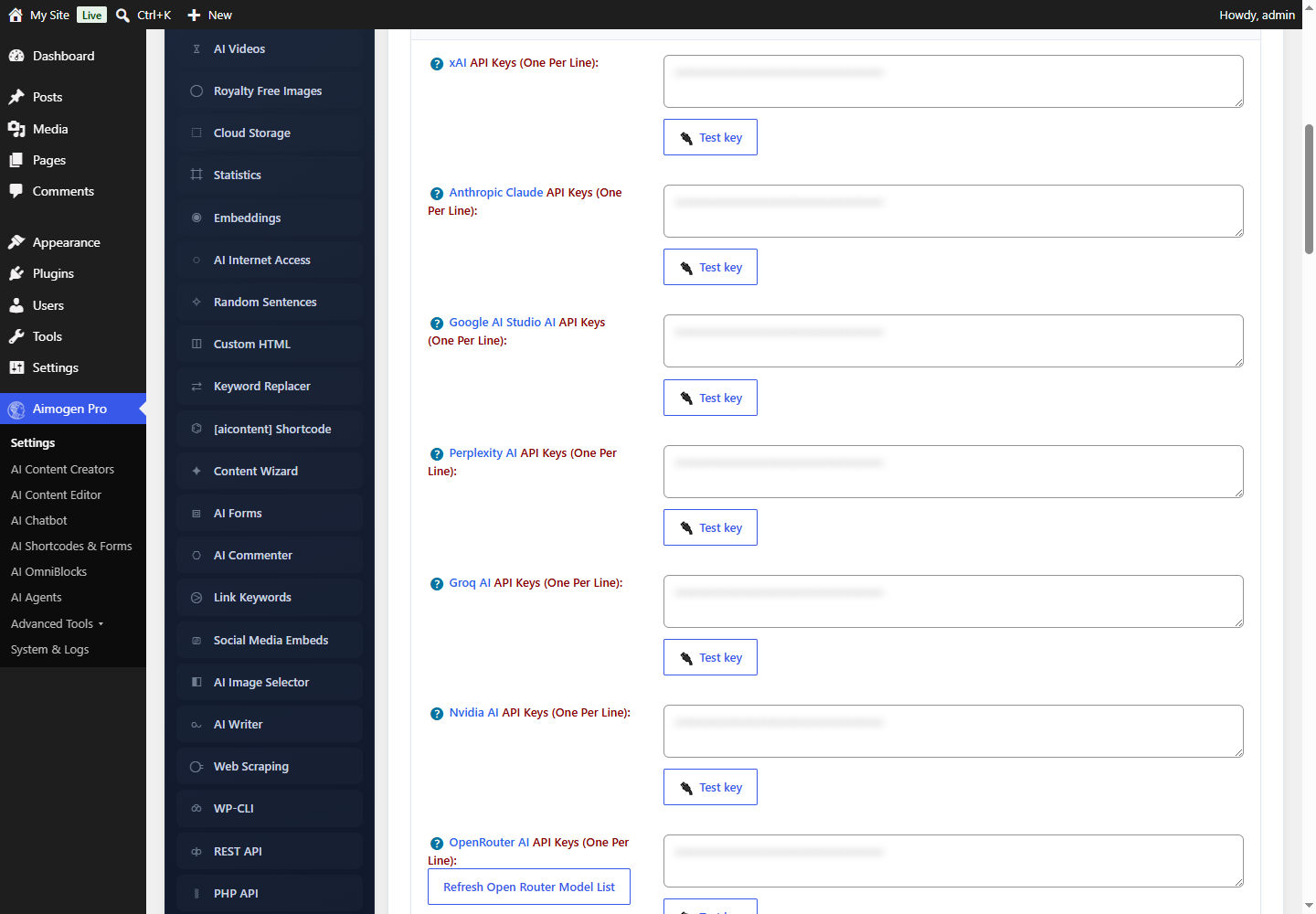
Every credential lives in one place: Aimogen Pro › Settings › API Keys.
Textual AI providers#
| Provider | Field | Notes |
|---|---|---|
| OpenAI | OpenAI / AiomaticAPI API Keys | Broadest feature coverage; required for Assistants, Batch, fine-tuning and OpenAI Vector Stores |
| AiomaticAPI | same field | A managed OpenAI-compatible gateway run by the plugin vendor |
| Microsoft Azure OpenAI | same field, with Main API Service Provider Selector set to Azure | Deployment-name based; separate API versions per feature |
| Anthropic Claude | Anthropic Claude API Keys | 17 models including Opus 5 and Sonnet 5 |
| Google AI Studio | Google AI Studio AI API Keys | Gemini text, vision, embeddings and Imagen |
| xAI | xAI API Keys | Grok models, including a coding model |
| Perplexity | Perplexity AI API Keys | Sonar models, web-grounded by design |
| Groq | Groq AI API Keys | Very fast inference on open-weight models |
| NVIDIA NIM | Nvidia AI API Keys | 32 hosted open models |
| OpenRouter | OpenRouter AI API Keys | One key, many upstream providers |
| Hugging Face | HuggingFace AI API Keys | Router and Inference Endpoints; you supply the model list |
| Ollama | Ollama URL (no key) | Self-hosted, local or remote |
| Custom OpenAI-compatible | Custom OpenAI Compatible API Base URL | Anything that speaks the OpenAI wire format |
Supporting services#
| Category | Services | Page |
|---|---|---|
| Images and video | OpenAI, Stability.AI, Google Imagen, Ideogram, Replicate, GoAPI (Midjourney), Cloudflare Workers | Image and video providers |
| Speech and voice | OpenAI, ElevenLabs, Google Text-to-Speech, Azure Speech Services, D-ID | Speech and voice providers |
| Search and SERP | Google Custom Search, SerpAPI, ValueSERP, SpaceSERP, Serper.dev, Tavily, plus built-in Bing and DuckDuckGo scraping | Search and SERP providers |
| Data and utility | Amazon PA-API, YouTube Data API, TranscriptAPI, TextRazor, NeuronWriter, PlagiarismCheck, DeepL, Microsoft Translator, Google Translate, HeadlessBrowserAPI | Data and utility providers |
| Vector stores | OpenAI Vector Stores, Pinecone, Qdrant, Chroma | Vector stores |
How the provider is chosen#
Aimogen Pro does not have a global "current provider" for text generation. It derives the provider from the model you select, per feature.
Each model selector in the plugin lists every model from every configured provider, annotated with its provider name. When a request runs, the plugin matches the model name against its provider tables and routes accordingly.
One setting does act globally: Settings › API Keys › Main API Service Provider Selector. It has three values and only affects the OpenAI-compatible slot:
| Value | Meaning |
|---|---|
openai | The key in OpenAI / AiomaticAPI API Keys is used against api.openai.com (or AiomaticAPI) |
azure | The same key field is used against your Azure endpoint with deployment names |
custom | The same key field is used against the base URL in Custom OpenAI Compatible API Base URL |
Anthropic, Google, xAI, Perplexity, Groq, NVIDIA, OpenRouter, Hugging Face and Ollama are unaffected by that selector — their models are routed by name regardless.
Setting keys#
For developers reading settings directly, the credential lives in aiomatic_Main_Settings under these
keys. All are textareas holding one key per line.
| Provider | Setting key |
|---|---|
| OpenAI / AiomaticAPI / Azure / Custom | app_id |
| Anthropic Claude | app_id_claude |
| Google AI Studio | app_id_google |
| xAI | app_id_xai |
| Perplexity | app_id_perplexity |
| Groq | app_id_groq |
| NVIDIA | app_id_nvidia |
| OpenRouter | app_id_openrouter |
| Hugging Face | app_id_huggingface |
| Ollama | ollama_url (a URL, not a key) |
api_selector chooses which destination the app_id slot targets: openai, azure or custom.
See Data model.
Multiple keys per provider#
Every provider key field is a textarea, one key per line. This gives you:
- Higher throughput. Requests spread across keys, so per-key rate limits bite later.
- Resilience. A key that starts failing can be taken out of rotation automatically. See Smart API-key rotation.
Settings › API Keys › Use Multiple API Keys When Creating The Same Post controls whether a single post sticks to one key for all its requests, or picks a fresh key per request. Sticking to one key produces more consistent rate-limit behaviour for long articles; rotating spreads load.
Testing a key#
Every key field has a Test API key button beside it. It performs a real, minimal request against the provider and reports success or the provider error text verbatim.
Use it whenever you paste a key. An untested key is the most common cause of scheduled runs that produce nothing at all.
Where keys are stored#
Provider credentials are stored in the WordPress options table, inside the aiomatic_Main_Settings
option, as plain text. This is the same storage model used by the overwhelming majority of WordPress
plugins that talk to third-party APIs.
Consequences and mitigations are covered in Where credentials are stored.
In short: anyone with database access or the manage_options capability can read them, so treat both as
privileged.
If you would rather not store keys in the database at all, supply them from code with the per-provider filters:
add_filter( 'aimogen_openai_api_key', function () {
    return defined( 'MY_OPENAI_KEY' ) ? MY_OPENAI_KEY : '';
} );
Every provider has an equivalent filter. See Filter reference.
Rate limiting and throttling#
Two settings deliberately slow the plugin down so you stay inside provider quotas:
Delay Between API & Scraping Requests (ms). A pause inserted between consecutive text and scraping calls. Raise it if you see HTTP 429 during bulk runs.
Delay Between API Requests For AI Image Generator APIs (ms). The same idea for image endpoints, which usually have much tighter limits than text endpoints.
Both live on Settings › API Keys. For automatic handling of 429s rather than blanket slowdown, see Reliability Mode.
Provider-specific Responses API#
Several providers now offer a "Responses" API alongside the classic chat completions API. Aimogen Pro exposes a toggle per provider under Settings › Advanced AI Settings:
| Setting | Provider |
|---|---|
Enable Usage Of OpenAI's Responses API | OpenAI |
Enable Usage Of xAI's Responses API | xAI |
Enable Usage Of Groq's Responses API (Experimental) | Groq |
Enable Usage Of OpenRouter's Responses API | OpenRouter |
Enable Usage Of Hugging Face's Responses API | Hugging Face |
Enable Usage Of Ollama's Responses API | Ollama |
Security considerations#
- Never paste a key into a support ticket, a public forum or a screenshot. Rotate it immediately if you do. The plugin diagnostics deliberately never print raw keys.
- Use restricted keys where the provider supports them. Scope to the models and spend you need.
- Set provider-side spending caps. The plugin usage limits protect your site; only the provider dashboard protects your card.
- Rotate keys when staff leave, since anyone with
manage_optionscould read them.
See Security and privacy.
Common errors, by cause#
| Message contains | Cause | Where to look |
|---|---|---|
invalid_api_key, incorrect api key, 401 | Wrong or revoked key | API and provider errors |
insufficient_quota, billing | No credit on the provider account | Provider billing dashboard |
rate limit, 429 | Too many requests | Raise the request delay, add keys, enable key rotation |
model_not_found, has been deprecated | Model retired or not enabled on your account | Selecting models |
context_length_exceeded | Prompt plus output exceeds the model window | Tokens and context |
content_filter, safety | Provider blocked the prompt or response | Content quality problems |
Start with OpenAI, or jump to the provider you use.
Still stuck? Open a support ticket and include the diagnostics from Aimogen Pro › System & Logs › System Info.