Scheduling and the posting cron
How Aimogen Pro schedules rule execution, the master cron event, per-rule intervals, run locking, and how to run a rule on demand.
Aimogen Pro runs bulk rules through WP-Cron. Understanding the two-level model explains most scheduling questions.
The two levels#
Level 1: the master cron event. A single WordPress cron event, aiomaticaction, wakes the plugin up.
By default it is scheduled on the aiomatic_cron_sfert interval — every 15 minutes.
Level 2: per-rule intervals. When the master event fires, the plugin walks every active rule and asks:
has enough time passed since this rule last ran? The rule Schedule value is a number of hours,
defaulting to 24. If the interval has elapsed, the rule runs.
So a rule with Schedule = 6 runs roughly every six hours, checked every fifteen minutes.
Custom cron intervals#
The plugin registers these WordPress schedules:
| Name | Interval | Display |
|---|---|---|
minutely | 60s | Once A Minute |
aiomatic_cron_ten | 600s | Aimogen Cron 10 Minute |
aiomatic_cron_sfert | 900s | Aimogen Cron Quarter Hour |
aiomatic_cron_half | 1800s | Aimogen Cron Half Hour |
aiomatic_cron | 3600s | Aimogen Cron |
weekly | 604800s | Once Weekly |
monthly | 2592000s | Once Monthly |
yearly | 31557000s | Once Yearly |
See Cron events for every event the plugin registers.
Minute-level scheduling#
Rule intervals are hours by default. Minute-level scheduling is unlocked by the separate CodeRevolution Schedule Minute/Hour Switcher plugin.
When it is active, the aiomatic_minute_running_unlocked option is set and two things change together:
- The master event is rescheduled to
minutely. - Every rule
Schedulevalue is interpreted as minutes rather than hours.
Minute scheduling also needs a real cron job firing at least every minute. WP-Cron on a low-traffic site will not deliver it.
Run locking#
Concurrent runs of the same rule would produce duplicates and waste API calls, so the plugin maintains a
aiomatic_running_list option recording which rules are executing.
A rule that is already in the list is skipped when the master event fires again. The entry is cleared when the run finishes.
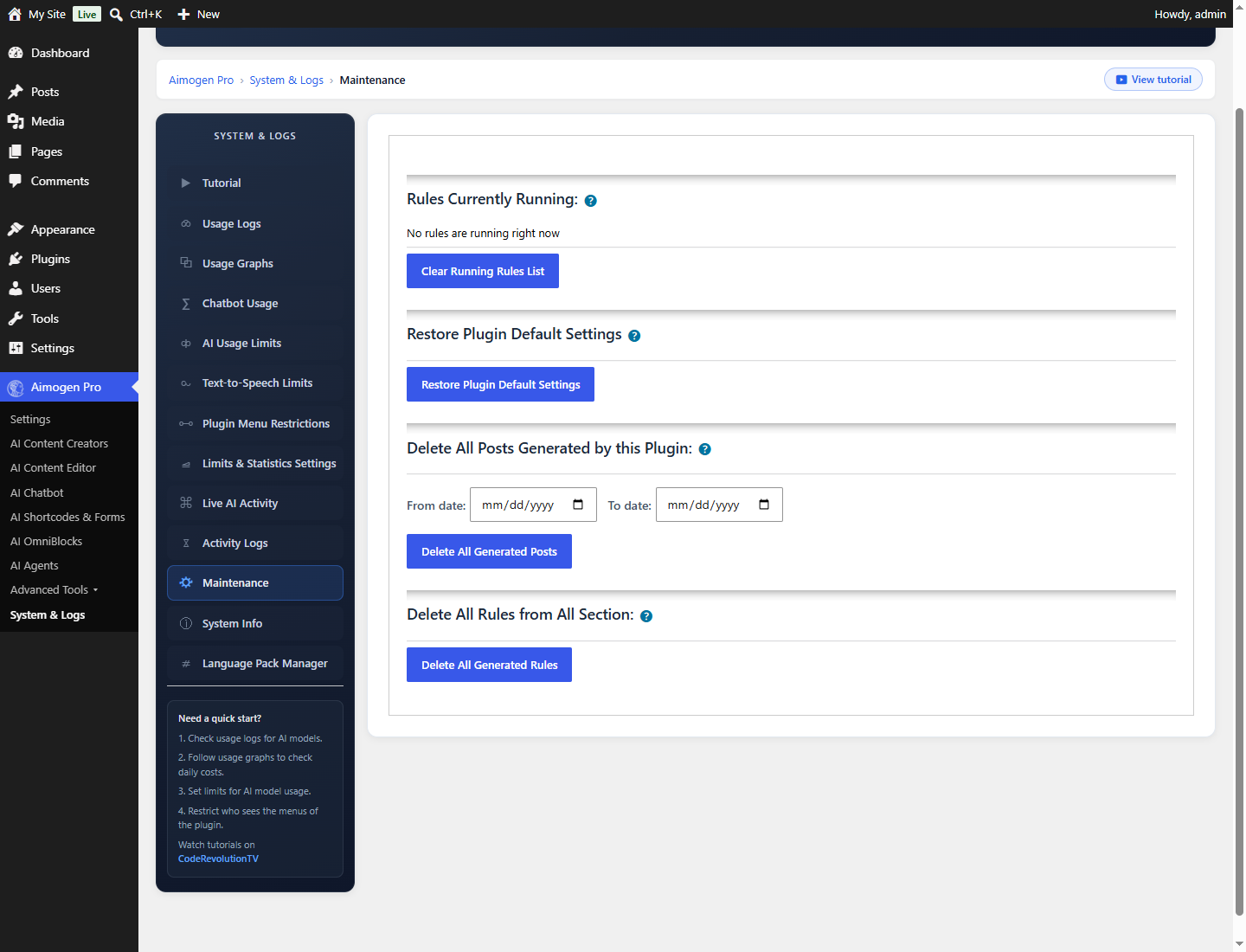
If a run dies — PHP fatal, timeout, host process kill — the entry can be left behind and the rule will be skipped forever after. The symptom is a rule that simply stops producing, with nothing in the error log.
The fix: System & Logs › Maintenance › Rules Currently Running › Clear Running Rules List. The screen labels it as a debugging tool, and that is the right framing — use it when a rule is stuck, not routinely.
Running a rule on demand#
Every rule list has a Run Now action. It ignores the schedule and the last-run timestamp, but still respects the running lock.
Use it for:
- Testing a new rule before enabling it
- Producing content immediately
- Reproducing a failure while watching Live AI Activity
Rules can also be run from WP-CLI, the REST API, the Abilities API, an agent tool or a chatbot extension.
Days of the week#
Do Not Run This Rule On The Following Days Of The Week skips selected days. Useful for keeping a
publishing rhythm that looks human, or for pausing over weekends.
Post-level scheduling#
Separately from rule scheduling, individual posts can be scheduled:
Set a Custom Post Publish Date Rangegives each post a random date in a range.- With
Post Statusset tofutureand a future date, WordPress publishes the post on schedule without the rule needing to run at that moment.
That combination is the cleanest way to generate a month of content in one run and have it appear gradually. See Publishing options.
Other scheduled work#
| Event | Purpose |
|---|---|
aiomaticaction | The master rule scheduler |
aiomaticeditaction | The AI Content Editor automatic editing run |
aiomaticactionclear | Automatic log clearing, on the interval in Auto Clear Logs |
aiomatic_new_post_cron | Processes a newly created or updated post |
aiomatic_handle_delayed_post | Processes a post after the configured editing delay |
aiomatic_index_single_post | Adds a post to the embeddings index |
aiomatic_agent_run_single, aiomatic_agent_recover, aiomatic_agents_watchdog | Agent execution |
aiomatic_expired_post_delete | Removes expired generated media |
aiomatic_license_recheck | Yearly licence revalidation |
aiomatic_wp_ai_connectors_warm_cache | Twice-daily cache warm for WordPress Connectors |
Making WP-Cron reliable#
WP-Cron only fires on a page load. On a low-traffic site, scheduled work runs late or not at all.
// wp-config.php
define( 'DISABLE_WP_CRON', true );# Every five minutes is enough for hour-level rules
*/5 * * * * curl -s "https://example.com/wp-cron.php?doing_wp_cron" > /dev/null 2>&1For minute-level scheduling, run it every minute.
Verify under System & Logs › System Info, which reports whether WP-Cron is disabled and lists the plugin scheduled events with their next run times.
Asynchronous processing#
Two settings affect how work is spread across requests:
| Setting | Where | Effect |
|---|---|---|
Use Async Posting Method | AI Content Editor | Editing work is dispatched asynchronously rather than inline |
Delay Article Editing By (Seconds) | AI Content Editor | Waits before processing a newly published post, so other plugins finish first |
Don't Use Jobs In The Advanced Mode Single Creators | Settings › General Settings | Disables job splitting in Advanced Mode |
Async processing keeps individual requests short, which matters on hosts with strict execution limits.
Common problems#
A rule never runs Work through Scheduled tasks do not run. The usual causes are no real cron trigger, the rule being inactive, or a stale entry in the running list.
A rule runs but produces nothing Different problem. See No posts are being created.
Runs happen at unpredictable times Expected. WP-Cron fires on page loads, and the master event is a 15-minute interval, so a rule set to "every hour" can drift.
Suddenly far more posts than expected The minute/hour switcher was activated and existing intervals are now minutes.
Related#
Still stuck? Open a support ticket and include the diagnostics from Aimogen Pro › System & Logs › System Info.