WordPress 7.0 Connectors
How Aimogen Pro integrates with the native WordPress 7 Connectors screen, the three modes, and what managed mode changes.
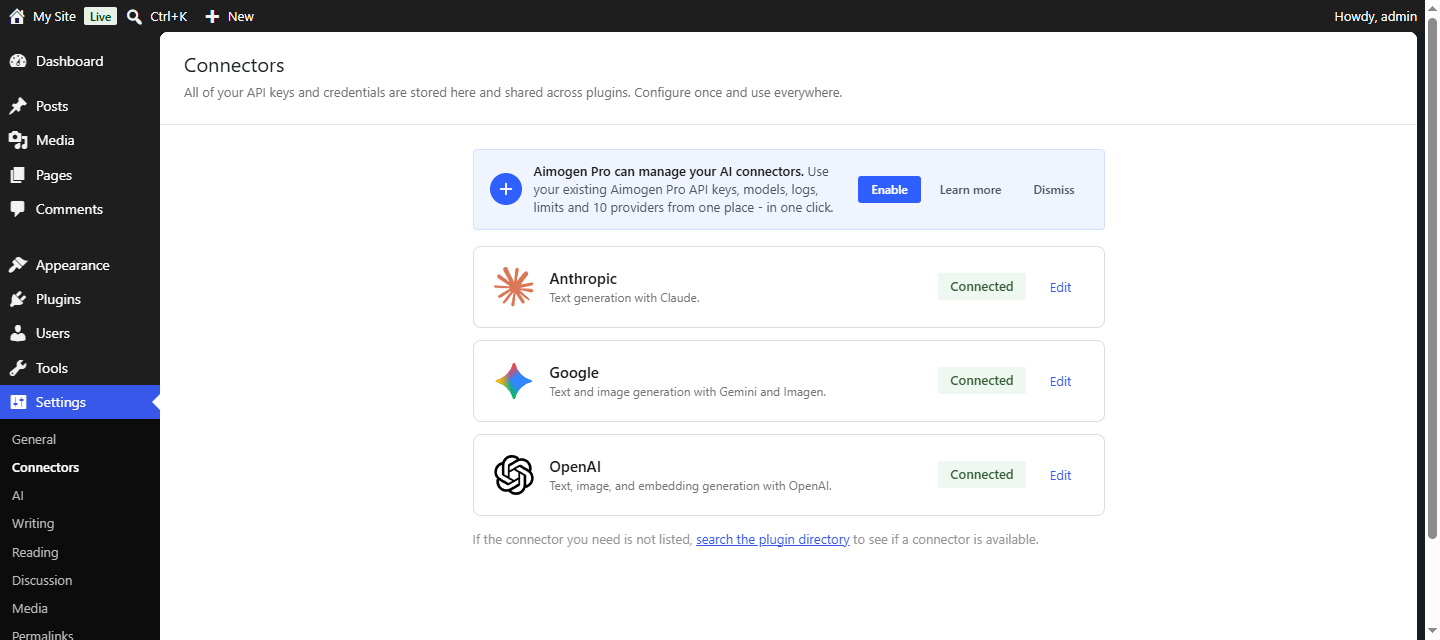
WordPress 7 ships an AI Connectors screen at Settings › Connectors
(/wp-admin/options-connectors.php), backed by WP_Connector_Registry. Aimogen Pro can take that screen
over and manage the AI provider connectors from it.
Added in 2.8.2.
The three modes#
| Mode | Behaviour |
|---|---|
observe (default) | A banner on the Connectors page offers to let Aimogen Pro manage the AI connectors |
managed | Aimogen Pro registers its providers in the registry and bridges API keys in both directions |
off | The integration is disabled entirely |
The banner can also be dismissed without changing the mode. The mode is stored in
aiomatic_wp_ai_connectors_mode.
What managed mode does#
Registers one connector per provider, replacing the WordPress core defaults so the cards no longer push standalone provider plugins. Ten providers are registered:
OpenAI, Anthropic, Google, OpenRouter, Perplexity, Groq, NVIDIA, xAI, HuggingFace and Ollama.
Bridges API keys in both directions. The connectors_ai_{id}_api_key value and the corresponding
Aimogen Pro key stay in sync, so you can manage credentials from either screen. A reentrance guard prevents
the two-way sync looping.
Declares credentials to the WordPress AI feature plugin. Through the wpai_* filters, WordPress AI
features light up when Aimogen providers are configured — including providers WordPress core has no
adapter for: Groq, NVIDIA, xAI, OpenRouter and Ollama.
That last point is the real value. WordPress core supports a handful of providers natively; managed mode extends the native AI features to every provider Aimogen Pro supports.
Model caching#
Provider model lists are cached in aiomatic_wp_ai_connectors_models and warmed twice daily by the
aiomatic_wp_ai_connectors_warm_cache cron event, so the Connectors screen loads without waiting on
provider APIs.
Filters#
| Filter | Purpose |
|---|---|
aiomatic_wp_ai_connectors_demote_competitors | Whether competing provider plugin cards are demoted |
aiomatic_wp_ai_connectors_learn_more_url | The learn-more link on the banner |
aiomatic_wpai_provider_adapters | Provider adapter registration |
aiomatic_wpai_no_sampling_model_prefixes | Model prefixes that do not accept sampling parameters |
See Filter reference.
Should you enable managed mode?#
Yes, if you are on WordPress 7+, want the native AI features to work, and want one place to manage provider credentials.
No, if you are on an earlier WordPress version (the integration simply does not activate), or you deliberately want the core Connectors screen left alone.
Turning it off restores the core behaviour. Your Aimogen Pro keys are unaffected either way.
Common problems#
No banner on the Connectors page. WordPress is below 7, or the integration mode is off, or the banner
was dismissed.
Keys are out of sync. Re-save on either screen to trigger the bridge.
A provider card is missing. It is one of the ten managed providers only when its key is configured.
Related#
Further detail is published at getaimogen.com/wordpress-7-0-connectors-documentation-aimogen-pro.
Still stuck? Open a support ticket and include the diagnostics from Aimogen Pro › System & Logs › System Info.