AI Forms
Building custom front-end AI tools with the Aimogen Pro form builder, including field types, prompts, history and OmniBlock triggers.
AI Forms let you build a front-end tool: a set of input fields, a prompt that uses them, and a rendered result. No code.
Aimogen Pro › AI Shortcodes & Forms
This tutorial was recorded before Aiomatic was renamed to Aimogen Pro. Some labels or interface elements may differ slightly from the current version.
This tutorial was recorded before Aiomatic was renamed to Aimogen Pro. Some labels or interface elements may differ slightly from the current version.
What you can build#
- A headline generator that takes a topic and an audience
- A product description writer that takes attributes
- A tone rewriter that takes text and a target tone
- A quote or estimate tool that takes requirements
- Anything that is "collect some input, run a prompt, show the result"
Building a form#
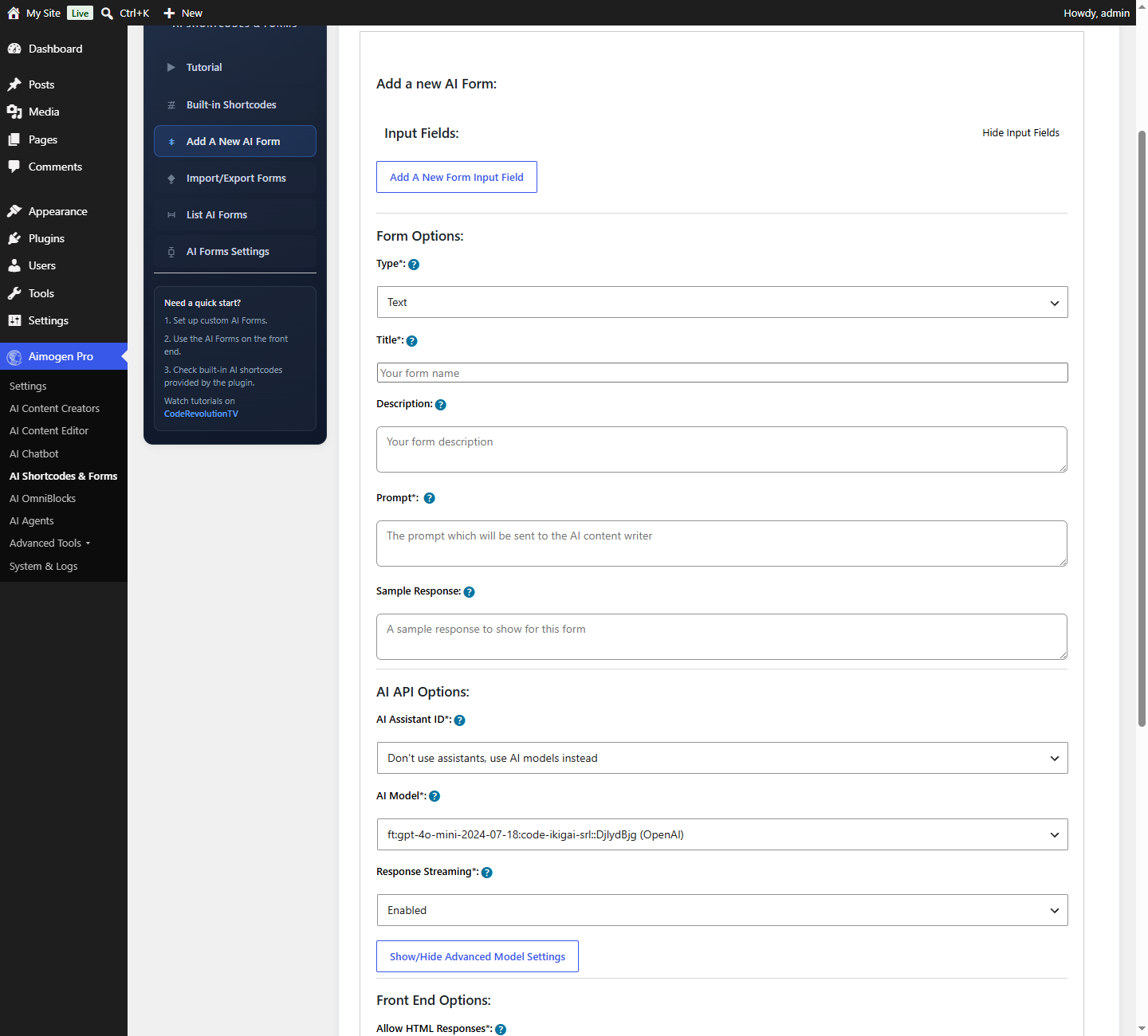
Add A New AI Form
- Add input fields. Each has a label, an ID, a type, and a required flag.
- Write the prompt, referencing fields by their IDs.
- Configure the model and generation parameters.
- Save, and place the form with its shortcode.
Field IDs are how the prompt gets input#
The Input Field ID is the critical part. Whatever you enter becomes a placeholder:
| Field ID | Placeholder |
|---|---|
topic | %%topic%% |
audience | %%audience%% |
tone | %%tone%% |
The settings help text states it directly: the value entered on the front end is available in the prompt
as %%ID_YOU_ENTER_HERE%%.
Write five headline options for an article about %%topic%%.

Target audience: %%audience%%
Tone: %%tone%%

Return them as a numbered list, nothing else. Each under 65 characters.
Use short, lowercase, single-word IDs. They are easier to reference and less error-prone.
Placing a form#
[aimogen-form id="12"]And the submission history for the current user:
[aimogen-form-history id="12"][aimogen-form-history userid="5"] shows a specific user history.
Form settings#
AI Shortcodes & Forms › AI Forms Settings
| Setting | What it does |
|---|---|
Minimum Length / Maximum Length | Input length bounds |
AI Image Size / AI Image Model | For image-producing forms |
Convert Markdown To HTML | Renders markdown in results |
Enable Katex | Renders mathematical expressions |
Store AI Prompts On OpenAI's Part | Provider retention |
Show Advanced Options | Exposes advanced controls to visitors |
Show Rich Editor | A rich text input instead of plain |
Enable Character Count | Live character counter |
Enable Copy | Copy-result button |
Enable PDF / Enable Download | Export the result |
Disable AI Form Saving | Do not store submissions |
Max Submissions Per User | Per-user cap |
Submit Button Location / Alignment | Layout |
Form Placeholder | Default placeholder text |
Form Append / Form Prepend | Text added to every prompt |
Background Color, Text Color, Button Color, Button Text Color | Styling |
Retrieval and internet access#
Forms participate in both, opt-in per context:
embeddings_formsunder Settings › Embeddings › Enable Embeddings Forinternet_formsunder Settings › AI Internet Access
A form that answers from your documentation is a genuinely useful front-end tool.
Triggering a workflow#
The ai_forms_omniblock OmniBlock trigger runs a workflow on submission,
receiving the full input as %%ai_forms_full_input_<id>%% plus each field by its ID.
That is how you build forms that do more than one AI call — scrape a URL the visitor supplies, analyse it, email a report.
Default forms#
A set of example forms is imported on first activation from the plugin defaults/ folder. The
Import/Export Forms tab moves forms between sites.
Forms are stored as aiomatic_forms posts.
Cost and abuse#
Common problems#
Placeholders render literally. The field ID does not match the placeholder. They are case-sensitive and must match exactly.
The form does not submit. Check the browser console — usually admin-ajax.php being blocked. See
Plugin and server conflicts.
Results are inconsistent. The prompt is under-specified. State the format and length explicitly.
Submissions are not saved. Disable AI Form Saving is on.
The history shortcode is empty. The user has no submissions, or saving is disabled.
Related#
Still stuck? Open a support ticket and include the diagnostics from Aimogen Pro › System & Logs › System Info.