OpenAI
How to configure OpenAI in Aimogen Pro, which models and features it unlocks, organisation IDs, the Responses API, and the OpenAI-only capabilities.
OpenAI is the provider with the broadest feature coverage in Aimogen Pro. Several plugin features work only with an OpenAI key.
Get a key#
- Sign in at platform.openai.com.
- Open API keys and create a secret key.
- Add a payment method under Billing. New accounts without credit return
insufficient_quotaon the first request.
Configure#
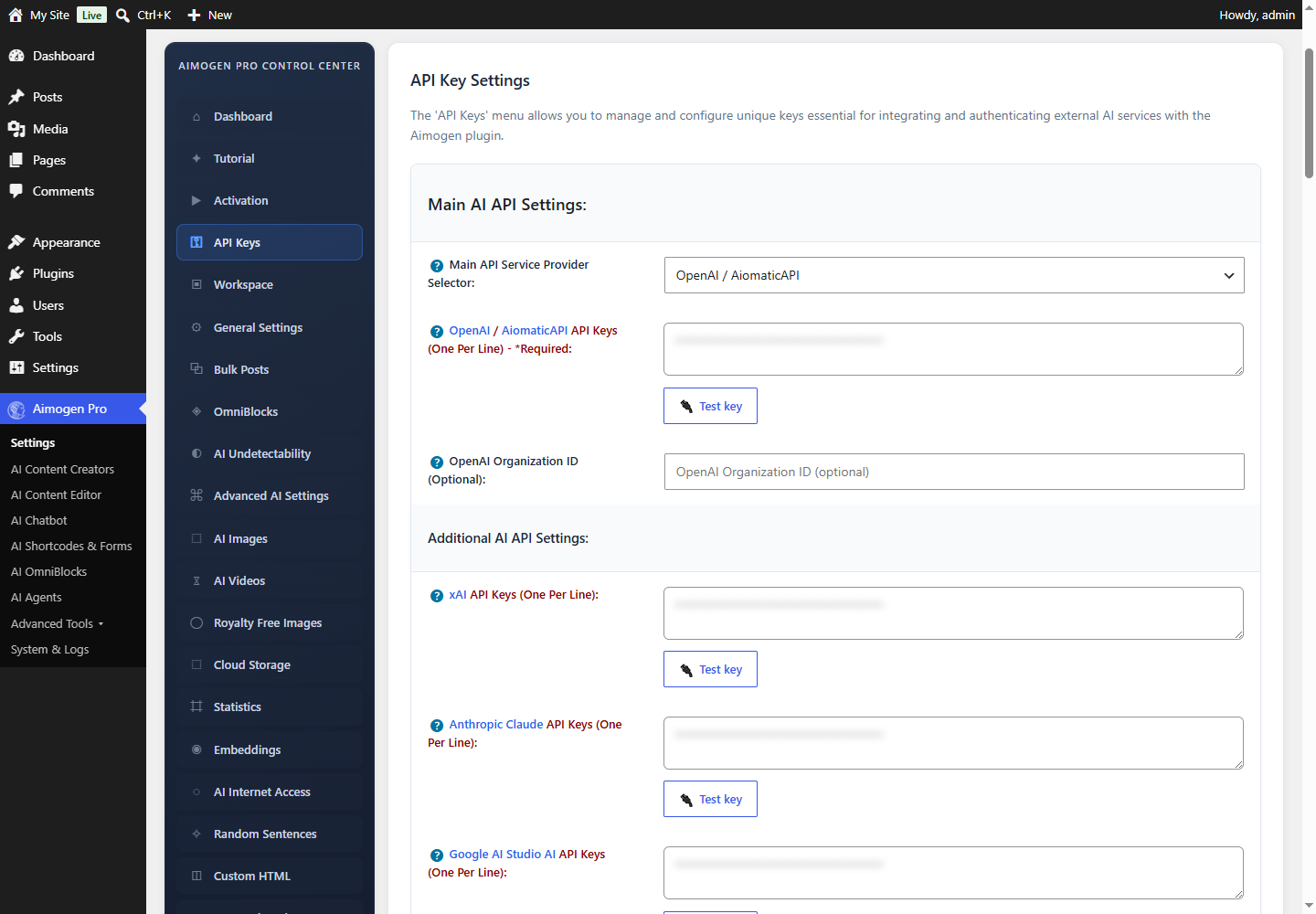
Aimogen Pro › Settings › API Keys
| Setting | Value |
|---|---|
| Main API Service Provider Selector | openai |
| OpenAI / AiomaticAPI API Keys | One key per line |
| OpenAI Organization ID (Optional) | Only if your account belongs to several organisations |
Select Test API key, then save.
Organization ID. If your OpenAI account belongs to multiple organisations, this header decides which one is billed. Leave it empty otherwise — an incorrect value produces a permission error on every request.
Models#
Aimogen Pro 2.8.8 ships with 60 OpenAI chat models in its list, including the GPT-5.x family, the
GPT-4.x family, the reasoning o-series and a Codex model.
| Family | Examples | Typical use |
|---|---|---|
| GPT-5.6 | gpt-5.6-luna, gpt-5.6-terra, gpt-5.6-sol | Current flagship tier |
| GPT-5.5 / 5.4 / 5.2 / 5.1 / 5 | gpt-5.5, gpt-5.5-pro, gpt-5.4-mini, gpt-5-mini, gpt-5-nano | General writing |
| GPT-4.1 | gpt-4.1, gpt-4.1-mini, gpt-4.1-nano | Cost-sensitive bulk work |
| GPT-4o | gpt-4o, gpt-4o-mini, plus search-preview variants | Vision and general use |
| Reasoning | o1, o1-pro, o3, o3-pro, o3-mini, o4-mini | Multi-step analysis |
| Coding | gpt-5.3-codex | Code generation, Snippets |
The plugin default is gpt-5-mini (AIMOGEN_DEFAULT_MODEL).
Deprecated models are removed on each release. If a rule stops working right after an update with
model_not_found, that is why — see Updating Aimogen Pro.
What OpenAI unlocks#
Features that require an OpenAI key and do not work with any other provider:
| Feature | Why |
|---|---|
| AI Assistants | Uses the OpenAI Assistants API |
| AI Batch Requests | Uses the OpenAI Batch API (roughly 50% cheaper, asynchronous) |
| AI Model Training | Fine-tuning is OpenAI-only in the plugin |
| OpenAI Vector Stores | One of four vector store backends |
| Realtime voice chatbot | Uses the OpenAI Realtime API |
| Sora video generation | sora-2, sora-2-pro |
gpt-image-* image generation | Alternatives exist, but this is the default |
Whisper / gpt-4o-transcribe speech-to-text | The only transcription backend |
| OpenAI text-to-speech | Alternatives exist (ElevenLabs, Google, Azure) |
text-embedding-3-* embeddings | Alternatives exist (Google, Ollama) |
Text generation, the chatbot, agents, OmniBlocks and the content editor all work fine without OpenAI.
The Responses API#
Settings › Advanced AI Settings › Enable Usage Of OpenAI's Responses API switches text generation to the newer Responses endpoint.
- It is switched on automatically when you select a model that only exists there, such as
o1-pro. - Leave it off unless you have a reason. The classic chat completions path is the more heavily exercised code path in the plugin.
Azure and AiomaticAPI share this field#
The same OpenAI / AiomaticAPI API Keys textarea serves three destinations, chosen by Main API Service Provider Selector:
openai→api.openai.comazure→ your Azure endpoint, see Microsoft Azure OpenAIcustom→ your own base URL, see Custom OpenAI-compatible APIs
You cannot use OpenAI and Azure simultaneously through this slot. You can combine OpenAI with Anthropic, Google, xAI and the rest, because those have their own key fields.
Endpoints used#
https://api.openai.com/v1/chat/completions
https://api.openai.com/v1/responses
https://api.openai.com/v1/embeddings
https://api.openai.com/v1/images/generations
https://api.openai.com/v1/audio/speech
https://api.openai.com/v1/audio/transcriptions
https://api.openai.com/v1/assistants
https://api.openai.com/v1/vector_stores
https://api.openai.com/v1/batches
https://api.openai.com/v1/fine_tuning/jobs
https://api.openai.com/v1/videos
If your host uses an outbound allowlist, api.openai.com must be reachable.
Data retention#
Settings › Advanced AI Settings › Store AI Prompts On OpenAI's Part maps to the OpenAI store
parameter. When off, OpenAI is asked not to retain the request for model improvement or logging beyond
what its policy requires.
The same option exists separately for the chatbot (AI Chatbot › API Parameters › Store AI Prompts On OpenAI's Part) and per rule.
Turn it off if you process personal data. See Data, GDPR and retention.
Common problems#
insufficient_quota / exceeded your current quota
No credit on the account, or a spend cap was hit. Check
platform.openai.com/usage. A ChatGPT subscription does not help.
invalid_api_key after pasting a correct key
Usually a copied newline or trailing space, or a key from a different organisation. Re-copy and use
Test API key.
HTTP 429 during bulk runs Your account tier limits requests per minute. Raise Delay Between API & Scraping Requests (ms), add more keys to the textarea, or enable Reliability Mode with key rotation.
model_not_found on a model you can see in the dropdown
Some models require organisation verification or a minimum spend tier before OpenAI enables them on your
account. Check the model page in the OpenAI docs.
Permission error mentioning organisation Clear the OpenAI Organization ID field, or set it to the correct organisation.
More in API and provider errors.
Related#
- Selecting models
- Controlling cost
- AiomaticAPI — a managed alternative that uses the same field
- Reliability Mode — fall back to another provider when OpenAI fails
Still stuck? Open a support ticket and include the diagnostics from Aimogen Pro › System & Logs › System Info.