The admin interface
A map of every Aimogen Pro admin menu and tab, what each screen is for, and which documentation page covers it.
Aimogen Pro adds one top-level menu, Aimogen Pro, plus one entry under Media. This page is the map: every screen, what it does, and where it is documented.
Menus appear only when the Plugin Main Switch is on and you have the access_aiomatic_menu
capability. Which of them you see also depends on your Workspace selection.
Top-level menus#
| Menu | Screen slug | What it is | Documentation |
|---|---|---|---|
| Settings | aiomatic_admin_settings | Global configuration: API keys, models, images, embeddings, integrations, APIs | see below |
| AI Content Creators | aiomatic_bulk_creators | Every post-creation tool, single and bulk | AI content creation |
| AI Content Editor | aiomatic_spinner_panel | Rewrite and enrich existing content | AI Content Editor |
| AI Chatbot | aiomatic_chatbot_panel | Chatbot and realtime chatbot configuration | AI Chatbot |
| AI Shortcodes & Forms | aiomatic_shortcodes_panel | Built-in shortcodes and the AI Forms builder | Shortcodes and forms |
| AI OmniBlocks | aiomatic_omniblocks | Workflow automation | OmniBlocks |
| AI Agents | aiomatic_agents_panel | Autonomous agents | AI Agents |
| Advanced Tools ▾ | aiomatic_developer_tools | A group header that expands the developer submenus | Advanced Tools |
| System & Logs | aiomatic_openai_status | Usage, limits, live activity, maintenance, diagnostics | System and Logs |
| Media › Aimogen Images | aiomatic-automatic-ai-content-writer | AI image generation and editing inside the Media Library | Media Library tools |
Advanced Tools submenus#
| Submenu | Slug | Documentation |
|---|---|---|
| AI Embeddings | aiomatic_embeddings_panel | Knowledge base and RAG |
| AI Model Training | aiomatic_openai_training | AI Model Training |
| AI Playground | aiomatic_playground_panel | AI Playground |
| AI MCP Integration | aiomatic_mcp_panel | MCP integration |
| AI Snippets | aiomatic_snippets_panel | AI Snippets Engine |
| AI Batch Requests | aiomatic_batch_panel | AI Batch Requests |
| AI Assistants | aiomatic_assistants_panel | AI Assistants |
| More Features | aiomatic_more | More AI tools |
Settings tabs#
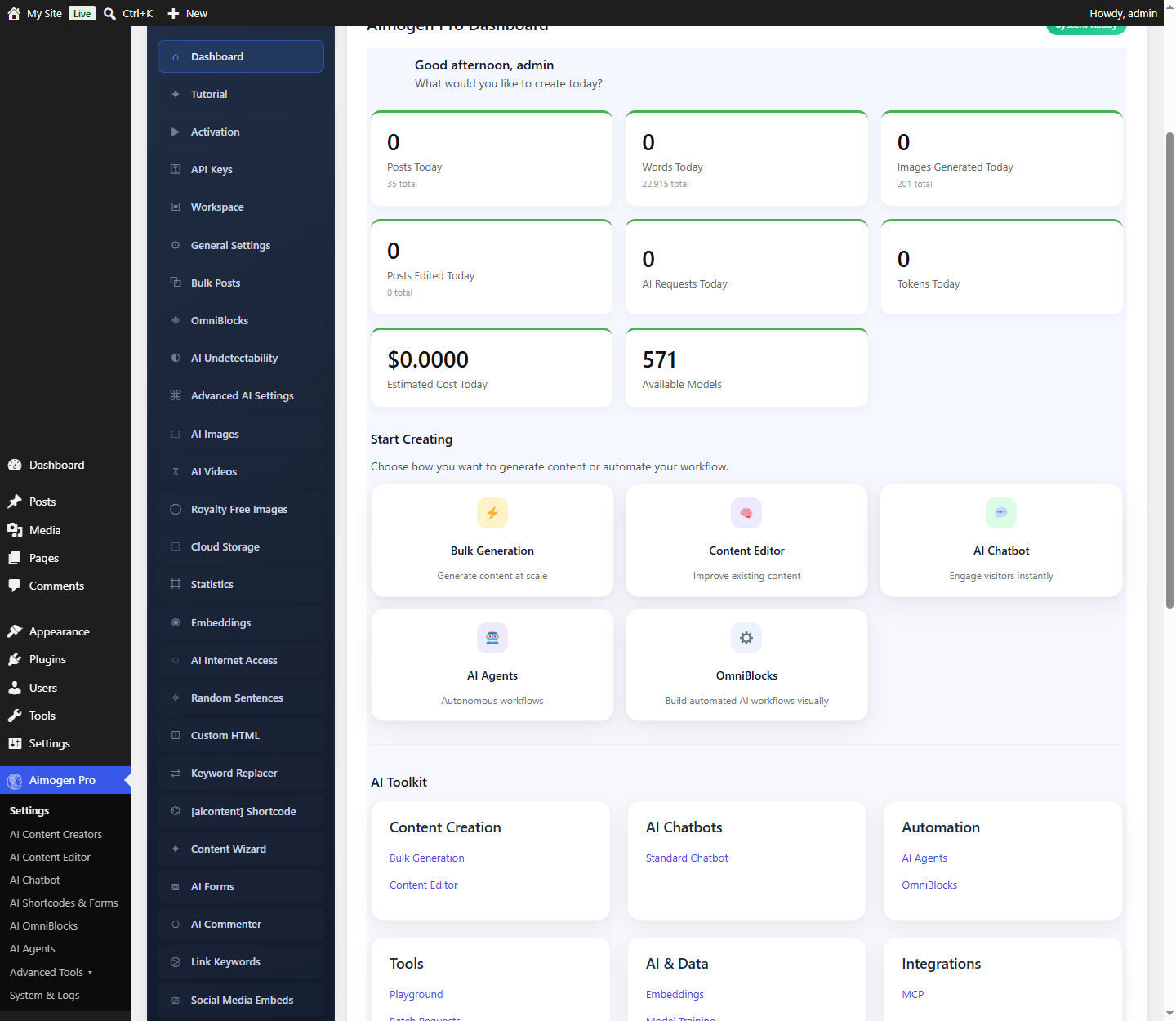
Settings is a single page with a left rail of tabs. They are grouped roughly by how often you need them.
| Tab | Covers | Documentation |
|---|---|---|
| Dashboard | At-a-glance widgets: recent activity, image stats, quick links | System and Logs |
| Tutorial | Embedded getting-started videos | Video tutorials |
| Activation | Licence entry and revocation | Activation and licensing |
| API Keys | Every provider credential | AI providers |
| Workspace | Which menus and features are visible | Workspace |
| General Settings | Main switch, logging, defaults, cron behaviour | System and Logs |
| Bulk Posts | Shared defaults for the bulk creators | AI content creation |
| OmniBlocks | Webhook and caching behaviour for workflows | OmniBlocks |
| AI Undetectability | Post-processing that reshapes AI phrasing | Content quality |
| Advanced AI Settings | Responses API toggles, custom model lists, Reliability Mode | Models and reliability |
| AI Images | Default image provider, model and size | Image generation |
| AI Videos | Video model and parameters | Video generation |
| Royalty Free Images | Pixabay, Pexels, Unsplash, Flickr, Openverse, Morguefile | Royalty-free images |
| Cloud Storage | S3-compatible offloading for generated media | Cloud storage |
| Statistics | What gets recorded per request | Usage logs |
| Embeddings | Default vector store, namespaces, what gets indexed | Knowledge base |
| AI Internet Access | Which search backend the AI may use | Search and SERP providers |
| Random Sentences | Text pools for %%random_sentence%% | Spintax and dynamic text |
| Custom HTML | Reusable HTML for %%custom_html%% | Placeholder reference |
| Keyword Replacer | Automatic term replacement in output | Internal and external linking |
[aicontent] Shortcode | Behaviour of the inline generation shortcode | The aicontent shortcode |
| Content Wizard | The editor-side AI assistant | More AI tools |
| AI Forms | Front-end form defaults | AI Forms |
| AI Commenter | Automatic AI replies to comments | More AI tools |
| Link Keywords | Keyword-to-URL linking rules | Internal and external linking |
| Social Media Embeds | Rich embeds pulled into generated posts | Featured images and in-post media |
| AI Image Selector | How images are chosen and ranked | Royalty-free images |
| AI Writer | Default model and parameters for the writer | Selecting models |
| Web Scraping | Proxies, JavaScript rendering, scraping method | Data and utility providers |
| WP-CLI | Enables the CLI commands | WP-CLI commands |
| REST API | Enables and secures the plugin REST endpoints | REST API |
| PHP API | In-plugin developer reference for aimogen() | PHP API |
System & Logs tabs#
| Tab | Purpose | Documentation |
|---|---|---|
| Usage Logs | Every API request as a table row | Usage logs |
| Usage Graphs | The same data plotted over time | Usage logs |
| Chatbot Usage | Per-chatbot usage breakdown | Persistent chat, history and logs |
| AI Usage Limits | Global and per-role credit limits | Usage limits |
| Text-to-Speech Limits | Separate credit pool for speech | Usage limits |
| Plugin Menu Restrictions | Hide menus from specific roles | Menu restrictions |
| Limits & Statistics Settings | What is recorded and for how long | Usage logs |
| Live AI Activity | Real-time stream of AI requests | Live AI Activity |
| Activity Logs | Rule execution log, with errors | Usage logs |
| Maintenance | Clear logs, reset settings, delete generated posts | Maintenance and cleanup |
| System Info | Environment report for support tickets | System Info |
| Language Pack Manager | Install and remove plugin translations | Translations |
Reading the settings screens#
Two conventions repeat everywhere:
The question-mark icon. Nearly every field has a ? help icon. Hovering it shows the description
written by the plugin authors. This documentation expands on those descriptions rather than repeating
them.
Conditional fields. Many rows are hidden until a related option is enabled. If a setting mentioned in this documentation is not on screen, check its prerequisite — the page for that feature always names it.
Next: Workspace: tailoring the menu.
Still stuck? Open a support ticket and include the diagnostics from Aimogen Pro › System & Logs › System Info.