Check Plugin Documentation
Get started quickly with our comprehensive guides
About this plugin
Ultimate Web Novel and Manga Scraper WordPress Plugin is a powerful tool to generate a manga website or even a web novel website that will automatically publish content (manga or web novel), without your further intervention.
– This plugin is a great tool to generate a passive income! Do you want to earn money even while you sleep?
– Do you want to generate manga or web novels to your new website?
– No problem! Ultimate Web Novel and Manga Scraper plugin is the right thing for you!
Our intuitive, easy-to-use system allows you to create a web site full of exciting manga or web novels.
The plugin uses the popular website fanfox.net to get manga and wuxiaworld.site to scrape web novels.
You can easily scrape:
- a large list of manga or comics, with full chapters and volumes
- a large list of web novels, with full chapters
This plugin will allow you to build a manga or a web novel site, without doing the boring uploading and publishing work, just configure the plugin and sit back and watch your site’s content grow. It will regularly publish scraped managa or web novels on your site, making it grow its content and get more hits from search engines.
Main features of the plugin:
- works with the Madara – WordPress Theme for Manga, created by wpstylish
- import full manga chapters from fanfox.net
- import full web novel chapters from wuxiaworld.site
- import by manga URL or by keyword search
- automatically run by a schedule and scrape multiple mangas with all their chapters
- manually run importing of chapters for manga or web novels
- proxy and headless browser support – bypass scraper protection with ease
- automatically add additional info to manga and web novels like: title, description, featured image, release date, author, artists, tags and genres (manga categories)
- upload images locally to your server or directly to cloud if you have set up CDN settings (Blogger, Blogspot, Amazon, Imgur, Flickr, FTP) in Madara theme’s settings
- automatically generate a featured image for the scraped manga or web novels
- enable/disable comments for the generated manga or web novels
- enable/disable pingbacks/trackbacks for the generated manga or web novels
- add your own custom warning message that will be displayed on all scraped manga/web novel chapters
- publish scraped manga automatically, or set it as draft/pending and publish it manually
- responsive design, fully mobile compatible
- full plugin documentation and tutorial included
- optimized for speed – no performance impact
- translations ready
- lifetime updates, great support
Plugin requirements:
PHP curl
WordPress installation
YouTube video tutorial:
I also provided a Quick Install Guide to feature an easy plugin installation for everyone.
To make this plugin work, first, you’ll need to install the plugin. The easiest method is to take the .zip file you’ve downloaded and upload it via Plugins > Add New > Upload Plugin in the WordPress Dashboard. Once the plugin is installed, be sure to Activate it.
Now that you’ve installed and activated the plugin, you’ll see a new menu item created inside WordPress called ‘Ultimate Web Novel and Manga Scraper’. First thing first, let’s head over to Settings > Ultimate Web Novel and Manga Scraper and take a look at what options are available.
Plugin Settings
Refreshingly, Ultimate Web Novel and Manga Scraper has a super-simple settings screen. Let’s look at first at the settings panel:
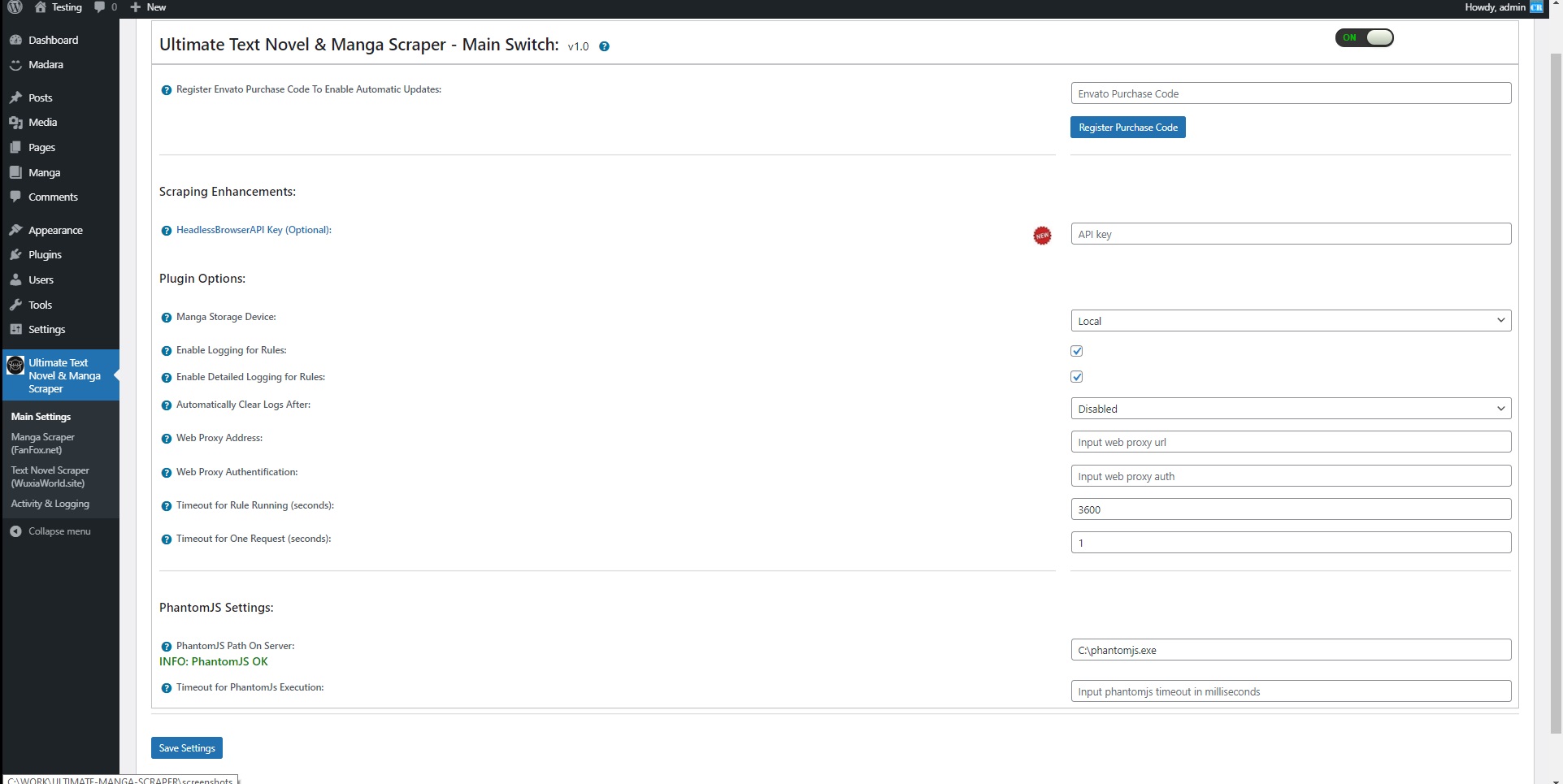
Here you can find the steps needed in configuring your plugin even if you have no HTML knowledge at all. You can find options for:
HINT! Don’t forget to click the Save button every time you modified your settings, otherwise the modifications will be lost!
Main Settings:
- Ultimate Web Novel and Manga Scraper Main Switch: Enable or disable the Ultimate Web Novel and Manga Scraper. This acts like a main switch.
- HeadlessBrowserAPI Key (Optional): If you wish to use the HeadlessBrowserAPI to render JavaScript generated content for your scraped pages, enter your API key here. If you enter a value here, new options will become available in the ‘Use PhantomJs/Puppeteer/Tor To Parse JavaScript On Pages’ in importing rule settings.
- Manga Storage Device: Select the storage you wish to use to store scraped manga. To display more options here, set up storage settings in Madara Theme Settings.
- Enable Logging for Rules: Do you want to enable logging for rules?
- Enable Detailed Logging for Rules: Do you want to enable detailed logging for rules? Note that this will dramatically increase the size of the log this plugin generates.
- Automatically Clear Logs After: Choose if you want to automatically clear logs after a period of time.
- Web Proxy Address: If you want to use a proxy to crawl webpages, input it’s address here. Required format: IP Address/URL:port
- Web Proxy Authentification: If you want to use a proxy to crawl webpages, and it requires authentification, input it’s authentification details here. Required format: username:password
- Timeout for Rule Running (seconds) Set the timeout (in seconds) for every rule running. I recommend that you leave this field at it’s default value (3600).
- Timeout for One Request (seconds): Set the timeout (in seconds) for every rule running. I recommend that you leave this field at it’s default value (90).
- PhantomJS Path On Server: Set the path on your local server of the phantomjs executable. If you leave this field blank, the default ‘phantomjs’ call will be used.
- Timeout for PhantomJs Execution: Set the timeout (in milliseconds) for every phantomjs running. I recommend that you leave this field at it’s default value (15000). If you leave this field blank, the default value will be used.
Manga Scraper (FanFox.net):
- ID This is the ID of the rule.
- Manga URL / Search Keyword Add the URL of the manga or a search keyword. Example manga URL: https://fanfox.net/manga/onepunch_man/ If you want to query all results returned by the advanced search setup, you can enter here a * (star symbol).
- Schedule (Hours) Select the interval in hours after which you want this rule to run.
- Max # Chapters Select the maximum number of chapters that this rule can create at once. 0-50 interval allowed..
- Del: Do you want to delete this rule?
- Chapter Status: Select the status that you want for the automatically generated manga to have.
- Manga Author: Select the author that you want to assign for the automatically generated manga.
- Active: Do you want to enable this rule? You can deactivate any rule (you don’t have to delete them to deactivate them).
- Info: The number of manga this rule has generated so far.
- Actions: Do you want to run this rule now? Note that only one instance of a rule is allowed at once.
Advanced Plugin Settings Dropdown Screen:
- Reverse Scraping (Start With Oldest Chapters): Do you want to reverse scraping of chapters and start with oldest?
- Search Result Type: Select the search result type to query.
- Search Manga Author: Select the manga author you wish to query.
- Search Manga Artist: Select the manga artist you wish to query.
- Search Manga Genres: Select the manga genres you wish to query.
- Exclude Manga Genres: Select the manga genres you wish to exclude.
- Manga Release Year Before: Set a release year to query manga before it.
- Manga Release Year After: Set a release year to query manga after it.
- Minimum Manga Rating: Set a minimum rating for the queried manga.
- Search Completed Manga: Do you want to search only completed manga?
- Results Sorting: Set the sorting of the manga results?
- Results Ordering: Select results ordering type.
- Maximum Number Of Manga to Scrape: Set the maximum manga count to scrape. This value is optional.
- Cache Items For Continuous Posting (disable to get first results page only): Do you want to remember last posted item and continue search from it the next time the importing rule runs?
- Additional Manga Genre: Select the manga genre that you want for the automatically generated manga to have.
- Auto Add Genres: Do you want to automatically add manga genres from the manga items?
- Auto Add Manga Tags: Do you want to automatically add manga tags from the manga items?
- Additional Manga Tags: Select the manga tags that you want for the automatically generated manga to have.
- Content Scraping Method To Use: Do you want to try to use PhantomJS to try to parse JavaScript from crawled pages (for pages that create dynamic content, on page load, using JavaScript)? Please note that for this to work, you must have PhantomJs installed on your server. You can configure the path to PhantomJS from your server, from plugin’s ‘Main Settings’.
- Enable Comments For Manga: Do you want to enable comments for the generated manga?
- Enable Pingback/Trackback: Do you want to enable pingbacks/trackbacks for the generated manga?
- Get Publish Date From Manga: Do you want to get the publish date from the source manga?
- Global Chapter Warning Message: Set a global chapter warning message to display on the scraped manga.
Web Novel Scraper (WuxiaWorld.site):
- ID This is the ID of the rule.
- Novels URL Add the URL of the Web Novel (or a comma separated list of Web Novel URLs). Example Web Novel URL: https://wuxiaworld.site/novel/super-gene-webnovel-read/ – you can also add a comma separated list of similar URLs.
- Schedule (Hours) Select the interval in hours after which you want this rule to run.
- Max # Chapters Select the maximum number of chapters that this rule can create at once. 0-50 interval allowed..
- Del: Do you want to delete this rule?
- Chapter Status: Select the status that you want for the automatically generated novel to have.
- Novel Author: Select the author that you want to assign for the automatically generated novel.
- Active: Do you want to enable this rule? You can deactivate any rule (you don’t have to delete them to deactivate them).
- Info: The number of novel this rule has generated so far.
- Actions: Do you want to run this rule now? Note that only one instance of a rule is allowed at once.
Advanced Plugin Settings Dropdown Screen:
- Reverse Scraping (Start With Oldest Chapters): Do you want to reverse scraping of chapters and start with oldest?
- Maximum Number Of Novels to Scrape Set the maximum novel count to scrape. This value is optional.
- Additional Novel Genre: Select the novel genre that you want for the automatically generated novel to have.
- Auto Add Genres: Do you want to automatically add novel genres from the novel items?
- Auto Add Novel Tags: Do you want to automatically add novel tags from the novel items?
- Additional Novel Tags: Select the novel tags that you want for the automatically generated novel to have.
- Content Scraping Method To Use: Do you want to try to use PhantomJS to try to parse JavaScript from crawled pages (for pages that create dynamic content, on page load, using JavaScript)? Please note that for this to work, you must have PhantomJs installed on your server. You can configure the path to PhantomJS from your server, from plugin’s ‘Main Settings’.
- Enable Comments For Novel: Do you want to enable comments for the generated novel?
- Enable Pingback/Trackback: Do you want to enable pingbacks/trackbacks for the generated novel?
- Get Publish Date From Novel: Do you want to get the publish date from the source novel?
- Global Chapter Warning Message: Set a global chapter warning message to display on the scraped novel.
Activity and Loggind Screen:
- Rules Currently Running: These rules are currently running on your server.
- Restore Plugin Default Settings: Hit this button and the plugin settings will be restored to their default values. Warning! All settings will be lost!
- Delete All Posts Generated by this Plugin: Hit this button and all posts generated by this plugin will be deleted!
- Activity Log: This is the main log of your plugin. Here will be listed every single instance of the rules you run or are automatically run by schedule jobs (if you enable logging, in the plugin configuration).
Summary
Ultimate Web Novel and Manga Scraper is a simple, yet powerful tool you can use to create an autoblog with ease. The setup and settings of the plugin couldn’t have been easier. Now, let’s go and enjoy the results of this great plugin! Have fun using it!
Sources and Credits
This component was made by Szabi CodeRevolution, for more information and support contact us at support@coderevolution.ro
Once again, thank you so much for purchasing this item. As I said at the beginning, I’d be glad to help you if you have any questions regarding this plugin and I’ll do my best to assist.
CodeRevolution