Check Plugin Documentation
Get started quickly with our comprehensive guides
About this plugin
uComment WP Comment Bot Plugin for WordPress is a breaking edge (made in 2018) WordPress to WordPress blog post comment creator plugin that is ideal for promoting your website.
Thanks to it’s ground breaking methods, comments generated by this plugin will generate interest for your website, by blog viewers and commenters.
Using this plugin, you can automatically generate blog comments based on posts you publish (manually or automatically) to your blog.
The goal is to achieve the following:
uComment WP Comment Bot will export comments to WordPress blogs. It will promote your posted content.
Plugin features:
- automatically leave comments on WordPress blog posts, based on RSS feeds you define
- Google Translate support – select the language in which you want to post your articles
- Text Spinner support – automatically modify generated text, changing words with their synonyms – built-in, The Best Spinner, SpinRewriter, WordAI and others – great SEO value!
- define publishing constrains: do not publish comments from posts that do not match some predefined rules (banned words, required words, category/tag filtering, etc)
- customize generated comment content (with the included wide variety of relevant comment shortcodes)
- detailed plugin activity logging
- manually post comments for older posts on your blog
Plugin requirements:
PHP 5.4 or higher
php CURL extension (install to Debian/Ubuntu etc with apt-get install php5-curl )
WordPress installation
Youtube video tutorial:
I also provided a Quick Install Guide to feature an easy plugin installation for everyone.
To make this plugin work, first, you’ll need to install the plugin. The easiest method is to take the .zip file you’ve downloaded and upload it via Plugins > Add New > Upload Plugin in the WordPress Dashboard. Once the plugin is installed, be sure to Activate it.
Now that you’ve installed and activated the plugin, you’ll see a new menu item created inside WordPress called ‘uComment WP Comment Bot’. First thing first, let’s head over to Settings > uComment WP Comment Bot and take a look at what options are available.
Plugin Settings
Refreshingly, uComment WP Comment Bot has a super-simple settings screen. Let’s look at first at the settings panel:
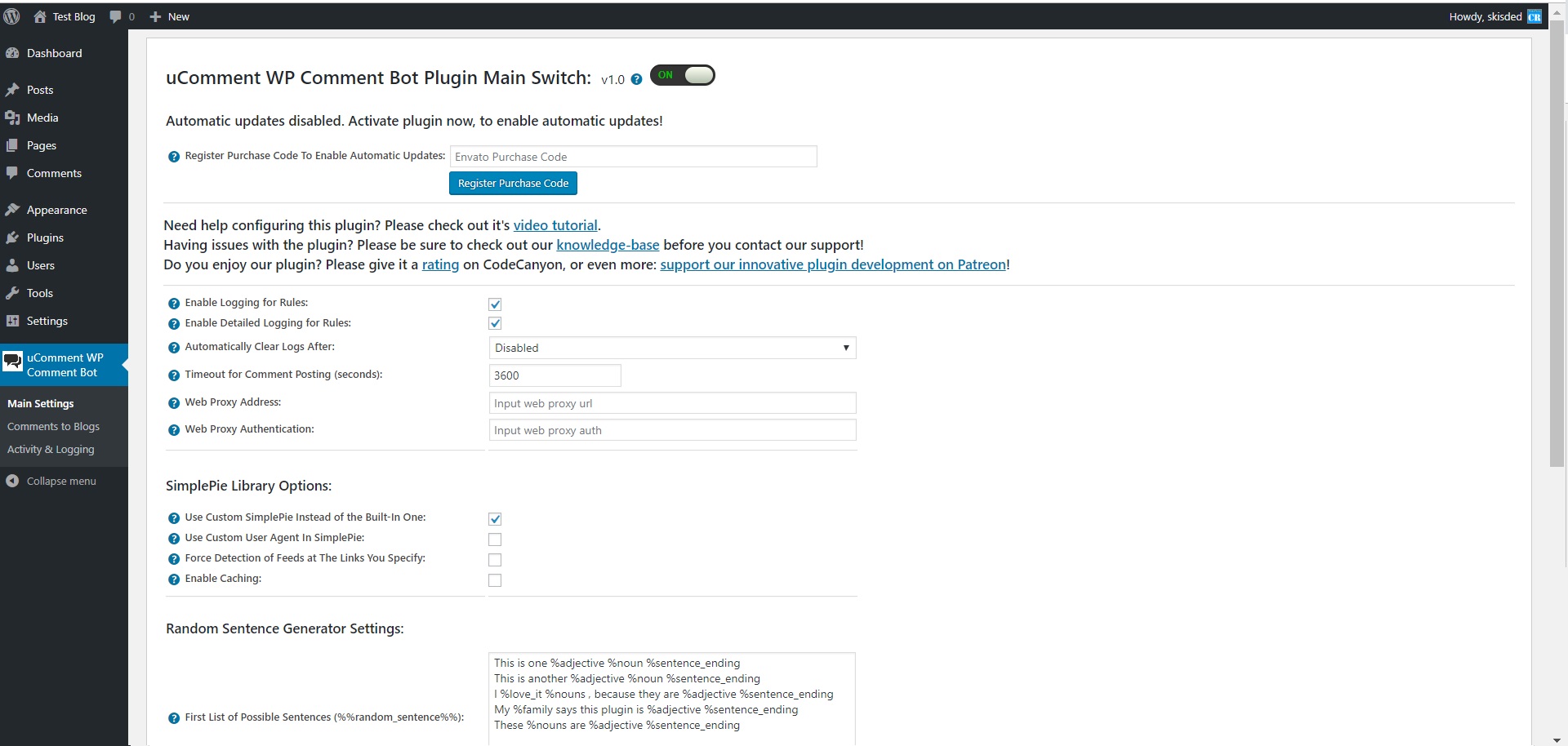
Here you can find the steps needed in configuring your plugin even if you have no HTML knowledge at all. You can find options for:
HINT! Don’t forget to click the Save button every time you modified your settings, otherwise the modifications will be lost!
Main Settings:
- uComment WP Comment Bot Main Switch: Enable or disable the uComment WP Comment Bot. This acts like a main switch.
- Enable Logging for Rules: Do you want to enable logging for rules?
- Enable Detailed Logging for Rules: Do you want to enable detailed logging for rules? Note that this will dramatically increase the size of the log this plugin generates.
- Automatically Clear Logs After: Choose if you want to automatically clear logs after a period of time.
- Timeout for Rule Running (seconds): Set the timeout (in seconds) for every rule running. I recommend that you leave this field at it’s default value (3600).
- Timeout for Comment Posting (seconds): Set the timeout (in seconds) for every comment posting. I recommend that you leave this field at it’s default value (3600).
- Web Proxy Address: If you want to use a proxy to crawl webpages, input it’s address here. Required format: IP Address/URL:port
- Web Proxy Authentication: If you want to use a proxy to crawl webpages, and it requires authentication, input it’s authentication details here. Required format: username:password.
- Spin Text Using Word Synonyms: Do you want to randomize text by changing words of a text with synonyms using one of the listed methods? Note that this is an experimental feature and can in some instances drastically increase the rule running time!
- Use Custom SimplePie Instead of the Built-In One: Choose if you want to use a custom SimplePie version instead of the built-in one in your WordPress installation.
- Use Custom User Agent In SimplePie: Select this checkbox if the feed you are grabbing is failing (and the host is blocking the User-Agent WordPress uses).
- Force Detection of Feeds at The Links You Specify: Click this option if your feeds are failing to create (this option will force the detection of a feed at the link you specify – will disable the built-in feed detection).
- Enable Caching: Click this option if your to enable feed caching – cache will be set to – plugin folder/res/cache.
- First List of Possible Sentences (%%random_sentence%%): Insert some sentences from which you want to get one at random. You can also use variables defined below. %something ==> is a variable. Each sentence must be sepparated by a new line.
- Second List of Possible Sentences (%%random_sentence2%%): Insert some sentences from which you want to get one at random. You can also use variables defined below. %something ==> is a variable. Each sentence must be sepparated by a new line.
- List of Possible Variables: Insert some variables you wish to be exchanged for different instances of one sentence. Please format this list as follows:Variablename => Variables (seperated by semicolon)Example:adjective => clever;interesting;smart;huge;astonishing;unbelievable;nice;adorable;beautiful;elegant;fancy;glamorous;magnificent;helpful;awesome
Comments to YouTube:
- RSS Feed List (WordPress Blogs Only): Input a list of RSS feeds from where the plugin will select posts to comment on.
- Target Blog Selection Method: Select the way the plugin will choose the blogs that it will post the comments on, from the multiple results it gets.
- Feed Item Processing Order: Select the way the plugin will process the feed items it gets from imported feeds.
- Feed Items Selection Method: Select the way the plugin will choose the posts from the blogs, that it will post the comments on, from the multiple results it gets.
- Maximum Number of Comments For Each Published Post: Select the maximum number of comments to post for each published post on your blog.
- Comment Template: Choose the template of your WordPress comments. You can use the following shortcodes: %%post_title%%, %%post_content%%, %%post_link%%, %%post_cats%%, %%post_tags%%, %post_excerpt%%, %%featured_image%%, %%author_name%%, %%blog_title%%, %%random_sentence%%, %%random_sentence2%%.
- Comment User Name List: Input a list of user names that the plugin will use when submitting comments. One per line. Possible shortcode that can be used here: %%author_name%%, %%random_sentence%%, %%random_sentence2%%
- Comment E-mail List: Input a list of e-mails that the plugin will use when submitting comments. One per line. Possible shortcode that can be used here: %%random_sentence%%, %%random_sentence2%%
- Comment URL List: Input a list of URLs that the plugin will use when submitting comments. One per line. Possible shortcode that can be used here: %%post_link%%, %%random_sentence%%, %%random_sentence2%%
- Shorten Exported URLs To WordPress Comments Using Bitly: Insert your Bitly API generic access token. To register at Bitly, please visit this link. To get a generic access token, please click the menu icon on the top right of the web (after you log in) -> click the ‘>’ sign next to your account name -> click the ‘Generic Access Token’ menu entry -> enter your password in the ‘Password’ field and click ‘Generate Token’. Copy the resulting token here. To lean more about this, please check this link.
- Bitly API Generic Access Token: Insert your Bitly API generic access token. To register at Bitly, please visit this link. To get a generic access token, please click the menu icon on the top right of the web (after you log in) -> click the ‘>’ sign next to your account name -> click the ‘Generic Access Token’ menu entry -> enter your password in the ‘Password’ field and click ‘Generate Token’. Copy the resulting token here. To lean more about this, please check this link.
- Automatically Translate Comments To: Do you want to automatically translate generated content using Google Translate?
- Translation Source Language: Select the source language for the translation.
- Spin Text Using Word Synonyms: Do you want to randomize text by changing words of a text with synonyms using one of the listed methods?
- Premium Spinner Service User Name/Email: Insert your user name on premium spinner service.
- Premium Spinner Service Password/API Key: Insert your password for the selected premium spinner service.
- Delay Posting By (Seconds): Do you want delay posting with this amount of seconds from post publish? This will create a single cron job for each post (cron is a requirement for this to function). If you leave this field blank, posts will be automatically published on post creation.
- Use Async Posting Method: This option will allow you to select if you want to run posting in async mode. This means that each time you publish a post, the plugin will try to execute it’s task in the background – it will no longer block new post posting, while it finishes it’s job.
- Maximum Comments Each Day: Select the maximum number of comments to post each day.
- Timeout Between Consecutive Comments (ms): Do you want to set a timeout between two consecutive API requests? This may prevent some rate limiting issues in the API. Default is 500ms.
- Target Blog Selection Method: Select the way the plugin will choose the video/channel that it will post the comments on, from the multiple results it gets (of videos/channels).
- Youtube Comment Template Choose the template of your Youtube comments. You can use the following shortcodes: %%post_title%%, %%post_content%%, %%post_link%%, %%post_cats%%, %%post_tags%%, %post_excerpt%%, %%featured_image%%, %%author_name%%, %%blog_title%%, %%random_sentence%%, %%random_sentence2%%.
- Automatically Shorten URLs: Choose if you want to automatically shorten URLs using Bitly URL shortener.
- Bitly API Generic Access Token: Insert your Bitly API generic access token. To register at Bitly, please visit this link. To get a generic access token, please click the menu icon on the top right of the web (after you log in) -> click the ‘>’ sign next to your account name -> click the ‘Generic Access Token’ menu entry -> enter your password in the ‘Password’ field and click ‘Generate Token’. Copy the resulting token here. To lean more about this, please check this link..
- Automatically Translate Content To: Do you want to automatically translate generated content using Google Translate?
- Translation Source Language: Select the source language for the translation.
- Spin Text Using Word Synonyms: Do you want to randomize text by changing words of a text with synonyms using one of the listed methods?
- Disable Autoposting of ‘Posts’: Do you want to disable automatically posting of WordPress ‘posts’ to Youtube?
- Disable Autoposting of ‘Pages’: Do you want to disable automatically posting of WordPress ‘pages’ to Youtube?
- Disable Autoposting of ‘Custom Post Types’: Do you want to disable automatically posting of WordPress ‘custom post types’ to Youtube?
- Banned Words List: Do not include posts that’s title or content contains at least one of these words. Separate words by comma. To disable this feature, leave this field blank.
- Required Words List: Do not include posts that’s title or content does not contain at least one of these words. Separate words by comma. To disable this feature, leave this field blank.
- Disable Autoposting of Selected Categories: Do you want to disable automatically posting of WordPress ‘posts’ to Youtube?
- Disable Autoposting of Selected Tags: Input the tags for which you want to disable posting. You can enter more tags, separated by comma. Ex: cars, vehicles, red, luxury. To disable this feature, leave this field blank.
- Help! App is authorized and still no new comments are appearing on Youtube? In this case you can try the following:1) Reauthorize the App. Simply click the ‘Reauthorize’ button and follow the steps given.2) Create a new App OAuth Key and Secret and try linking the new one in the plugin.
Activity and Loggind Screen:
- Restore Plugin Default Settings: Hit this button and the plugin settings will be restored to their default values. Warning! All settings will be lost!
- Activity Log: This is the main log of your plugin. Here will be listed every single instance of the rules you run or are automatically run by schedule jobs (if you enable logging, in the plugin configuration).
How to customize resulting posts with built in shortcodes?
You can use the following shortcodes in post title and content editing:
%%post_title%%, %%post_content%%, %%post_link%%, %%post_cats%%, %%post_tags%%, %post_excerpt%%, %%featured_image%%, %%author_name%%, %%blog_title%%, %%random_sentence%%, %%random_sentence2%%.
- %%random_sentence%% – generates a random sentence (as you have defined them in plugin config.) More on how to configure the random sentence generator, check plugin documentation (down)
- %%random_sentence2%% – generates a random sentence (from the second geenrator) (as you have defined them in plugin config.) More on how to configure the random sentence generator, check plugin documentation (down)
- %%post_title%% – the title of the published post
- %%post_content%% – the content of the published post
- %%post_link%% – the link of the published post
- %%post_cats%% – the categories of the published post
- %%post_tags%% – the tags of the published post
- %%post_excerpt%% – the excerpt of the published post
- %%featured_image%% – the featured images of the published post
- %%author_name%% – the name of the author of the published post
- %%author_name%% – the excerpt of the published post
- %%blog_title%% – the title of the blog
How to work with ‘Random Sentence Generator’?
You can use the Random Sentence Generator by inserting list of sentences to the ‘First List of Possible Sentences (%%random_sentence%%)’ text field. Here, you can add full sentences, or sentences with variables. Variables are structured as: %something. A possible list of sentences can be:
- Meet this %adjective %noun %sentence_ending
- This is the %adjective %noun ever%sentence_ending
- I %love_it %nouns , because they are the %adjective %sentence_ending
- My %family says this plugin is very %adjective %sentence_ending
- These %nouns are quite %adjective %sentence_ending
You can define variables in the ‘List of Possible Variables:’ textfield. Here you can define values to variables, values which will be used in the random sentence forming. Variables can be defined as follows:
variable_name1 => variable_value1;variable_value2;variable_value3

variable_name2 => variable2_value1;variable2_value2;variable2_value3
You can also use variables in variable definition. Example:
noun_with_adjective => %noun;%adjective %noun
An example of variable definition:
adjective_very => %adjective;very %adjective;

adjective => clever;interesting;smart;huge;astonishing;unbelievable;nice;adorable;beautiful;elegant;fancy;glamorous;magnificent;helpful;awesome

noun_with_adjective => %noun;%adjective %noun

noun => plugin;WordPress plugin;item;ingredient;component;constituent;module;add-on;plug-in;addon;extension

nouns => plugins;WordPress plugins;items;ingredients;components;constituents;modules;add-ons;plug-ins;addons;extensions

love_it => love;adore;like;be mad for;be wild about;be nuts about;be crazy about

family => %adjective %family_members;%family_members

family_members => grandpa;brother;sister;mom;dad;grandma

sentence_ending => .;!;!!
These random sentences can be used in post titles or post content, by adding the %%random_sentence%% or %%random_sentence2%% shortcode.
Summary
uComment WP Comment Bot is a simple, yet powerful tool you can use to promote your blog with ease. The setup and settings of the plugin couldn’t have been easier. Now, let’s go and enjoy the results of this great plugin! Have fun using it!
Sources and Credits
This component was made by Szabi CodeRevolution, for more information and support contact us at support@coderevolution.ro
Once again, thank you so much for purchasing this item. As I said at the beginning, I’d be glad to help you if you have any questions regarding this plugin and I’ll do my best to assist.
CodeRevolution