Check Plugin Documentation
Get started quickly with our comprehensive guides
About this plugin
This plugin will allow you to build from scratch an autoblogging system, based on Spintax article templates you define (based on keywords and search terms).
This plugin provides one solution to the ongoing search for new blog content. It not only provides a steady stream of rich, searchable content. You can build rules that will generate posts that are near to unique in website crawlers’s eyes. They require none to very little customization.
The goal is to achieve the following:
Spinomatic Automatic Post Generator will generate posts from an unlimited number of Spintax article templates, you define to your blog. Resulting blog posts are fully customizable and rich in content. List of customizable stuff for each post:
- post author user name
- post status (published, draft, pending, private, trash)
- automatically generate post categories or tags from Spintax posts
- manually add post categories or tags to items
- generate post or page
- automatically generate a featured image for the post
- enable/disable comments for the generated post
- enable/disable pingbacks/trackbacks for the generated post
- customize post title and content (with the included wide variaty of relevant post shortcodes)
Other plugin features:
- Google Translate support ‘ select the language in which you want to post your articles
- Text Spinner support ‘ automatically modify generated text, changing words with their synonyms ‘ great SEO value!
- Using CodeBird Spintax API
- Keyword Replacer (replace relevant keywords with your links)
- Random sentence generator (relevant sentences – as you define them)
- detailed plugin activity logging
- scheduled rule runs
What exactly, is spintax?
Article Spinning
- Submitting to various article directories
- Submitting to blog networks
- Creating unique content for a website/blog
Spintax Example
Writing articles is a lot of fun.
{Writing|Creating} {articles|stories} is a {lot of fun|rewarding experience}.
Writing stories is a lot of fun.
Creating articles is a rewarding experience.
Creating stories is a rewarding experience.
Nested Spintax
Article directories are an important aspect of SEO.
Article directories are useful for getting backlinks.
Article directories are an important element of SEO.
Optional Words or Phrases
The best {|overall|general} product.
The best overall product.
The best general product.
The best product.
Spintax Formats
{word1|word2}
{word1 {level 2|level two}|word 2}
The Best Spintax Strategy
- Don’t be tempted to use an auto-replace option in your software spinner as you’ll just end up with a junk article that will take you quite a while to clean up.
- Manually spin each sentence or paragraph. If you have a large article, then perhaps spin ever second or third sentence.
- Then go through a spin at the word/phrase level by manually selecting the best synonyms. This is an easy task with spinners like The Best Spinner.
- Make sure you proof read a couple of examples of the spun article to make sure it reads OK and doesn’t have any bad grammar or clumsy sentence construction.
WordPress installation
Youtube video tutorial:
I also provided a Quick Install Guide to feature an easy plugin installation for everyone.
To make this plugin work, first, you’ll need to install the plugin. The easiest method is to take the .zip file you’ve downloaded and upload it via Plugins > Add New > Upload Plugin in the WordPress Dashboard. Once the plugin is installed, be sure to Activate it.
Now that you’ve installed and activated the plugin, you’ll see a new menu item created inside WordPress called ‘Spinomatic Automatic Post Generator’. First thing first, let’s head over to Settings > Spinomatic Automatic Post Generator and take a look at what options are available.
Plugin Settings
Refreshingly, Spinomatic Automatic Post Generator has a super-simple settings screen. Let’s look at first at the settings panel:
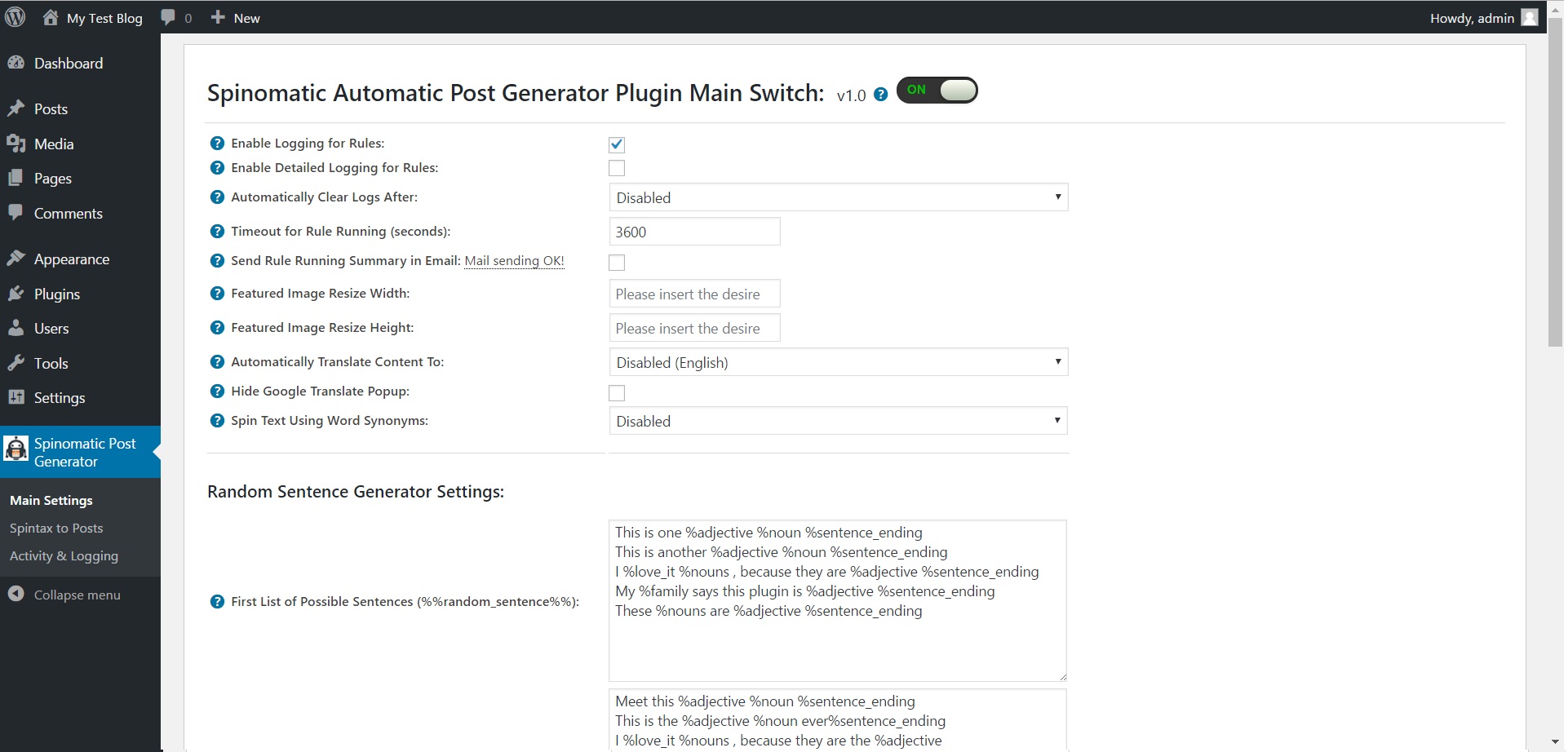
Here you can find the steps needed in configuring your plugin even if you have no HTML knowledge at all. You can find options for:
HINT! Don’t forget to click the Save button every time you modified your settings, otherwise the modifications will be lost!
Main Settings:
- Spinomatic Automatic Post Generator Main Switch: Enable or disable the Spinomatic Automatic Post Generator. This acts like a main switch.
- Enable Logging for Rules: Do you want to enable logging for rules?
- Enable Detailed Logging for Rules: Do you want to enable detailed logging for rules? Note that this will dramatically increase the size of the log this plugin generates.
- Automatically Clear Logs After: Choose if you want to automatically clear logs after a period of time.
- Timeout for Rule Running (seconds): Set the timeout (in seconds) for every rule running. I recommend that you leave this field at it’s default value (3600).
- Send Rule Running Summary in Email: Choose if you want to receive a summary of the rule running in an email.
- Email Address: Input the email adress where you want to send the report. You can input more email addresses, separated by commas.
- Automatically Translate Content To: Do you want to automatically translate generated content using Google Translate?
- Spin Text Using Word Synonyms: Do you want to randomize text by changing words of a text with synonyms using one of the listed methods? Note that this is an experimental feature and can in some instances drastically increase the rule running time!
- First List of Possible Sentences (%%random_sentence%%): Insert some sentences from which you want to get one at random. You can also use variables defined below. %something ==> is a variable. Each sentence must be sepparated by a new line.
- Second List of Possible Sentences (%%random_sentence2%%): Insert some sentences from which you want to get one at random. You can also use variables defined below. %something ==> is a variable. Each sentence must be sepparated by a new line.
- List of Possible Variables: Insert some variables you wish to be exchanged for different instances of one sentence. Please format this list as follows:Variablename => Variables (seperated by semicolon)Example:adjective => clever;interesting;smart;huge;astonishing;unbelievable;nice;adorable;beautiful;elegant;fancy;glamorous;magnificent;helpful;awesome
- Custom HTML Code #1: Insert a custom HTML code that will replace the %%custom_html%% variable. This can be anything, even an Ad code.
- Custom HTML Code #2: Insert a custom HTML code that will replace the %%custom_html2%% variable. This can be anything, even an Ad code.
- ID (Affiliate Keyword Replacer Tool Settings:) This is the ID of the rule.
- DEL (Affiliate Keyword Replacer Tool Settings:) Do you want to delete this rule?
- Search Keyword (Affiliate Keyword Replacer Tool Settings:) This keyword will be replaced with a link you define.
- Replacement Keyword (Affiliate Keyword Replacer Tool Settings:) This keyword will replace the search keyword you define. Leave this field blank if you only want to add an URL to the specified keyword.
- Link To Add (Affiliate Keyword Replacer Tool Settings:) Define the link you want to appear the defined keyword. Leave this field blank if you only want to replace the specified keyword without linking from it.
Rules List Settings Screen:
- ID This is the ID of the rule.
- Post Title Input your desired post title. Nested spintax supported.
- Post Content Input your desired post content. Nested spintex supported.
- Schedule (Hours) Select the interval in hours after which you want this rule to run.
- Max Posts At A Time Select the maximum number of posts that this rule can create at once. 0-50 interval allowed..
- Del: Do you want to delete this rule?
- Post Status: Select the status that you want for the automatically generated posts to have.
- Item Type : Select the type (post/page) for your automatically generated item.
- Post Author : Select the author that you want to assign for the automatically generated posts.
- Active: Do you want to enable this rule? You can deactivate any rule (you don’t have to delete them to deactivate them).
- Info: The number of items (posts, pages) this rule has generated so far.
- Actions: Do you want to run this rule now? Note that only one instance of a rule is allowed at once.
Advanced Plugin Settings Dropdown Screen:
- Generated Post Format: If your template supports “Post Formats”, than you can select one here. If not, leave this at it’s default value.
- Additional Post Category: Select the post category that you want for the automatically generated posts to have.
- Automatically Add Post Categories From Items: Do you want to automatically add post categories from the feed items?
- Automatically Add Post Tags From Items: Do you want to automatically add post tags from the feed items?
- Additional Post Tags: Select the post tags that you want for the automatically generated posts to have.
- Enable Comments For Generated Posts: Do you want to enable comments for the generated posts?
- Enable Pingbacks/Trackbacks For Generated Posts: Do you want to enable pingbacks and trackbacks for the generated posts?
- Default Featured Image if No Image Available for Item: Insert a link to a valid image that will be set for the featured image for the posts that do not have a valid image attached or if you disabled automatical featured image generation. To disable this feature, leave this field blank.
Activity and Loggind Screen:
- Rules Currently Running: These rules are currently running on your server.
- Restore Plugin Default Settings: Hit this button and the plugin settings will be restored to their default values. Warning! All settings will be lost!
- Delete All Posts Generated by this Plugin: Hit this button and all posts generated by this plugin will be deleted!
- Activity Log: This is the main log of your plugin. Here will be listed every single instance of the rules you run or are automatically run by schedule jobs (if you enable logging, in the plugin configuration).
How to customize resulting posts with built in shortcodes?
You can use the following shortcodes in post title and content editing:
- %%random_sentence%% – generates a random sentence (as you have defined them in plugin config.) More on how to configure the random sentence generator, check plugin documentation (down)
- %%random_sentence2%% – generates a random sentence (from the second geenrator) (as you have defined them in plugin config.) More on how to configure the random sentence generator, check plugin documentation (down)
- %%custom_html%% – includes the custom HTML you defined in the Main Settings interface (Custom HTML Code #1:)
- %%custom_html2%% – includes the custom HTML you defined in the Main Settings interface (Custom HTML Code #2:)
How to work with ‘Random Sentence Generator’?
You can use the Random Sentence Generator by inserting list of sentences to the ‘First List of Possible Sentences (%%random_sentence%%)’ text field. Here, you can add full sentences, or sentences with variables. Variables are structured as: %something. A possible list of sentences can be:
- Meet this %adjective %noun %sentence_ending
- This is the %adjective %noun ever%sentence_ending
- I %love_it %nouns , because they are the %adjective %sentence_ending
- My %family says this plugin is very %adjective %sentence_ending
- These %nouns are quite %adjective %sentence_ending
You can define variables in the ‘List of Possible Variables:’ textfield. Here you can define values to variables, values which will be used in the random sentence forming. Variables can be defined as follows:
variable_name1 => variable_value1;variable_value2;variable_value3

variable_name2 => variable2_value1;variable2_value2;variable2_value3
You can also use variables in variable definition. Example:
noun_with_adjective => %noun;%adjective %noun
An example of variable definition:
adjective_very => %adjective;very %adjective;

adjective => clever;interesting;smart;huge;astonishing;unbelievable;nice;adorable;beautiful;elegant;fancy;glamorous;magnificent;helpful;awesome

noun_with_adjective => %noun;%adjective %noun

noun => plugin;WordPress plugin;item;ingredient;component;constituent;module;add-on;plug-in;addon;extension

nouns => plugins;WordPress plugins;items;ingredients;components;constituents;modules;add-ons;plug-ins;addons;extensions

love_it => love;adore;like;be mad for;be wild about;be nuts about;be crazy about

family => %adjective %family_members;%family_members

family_members => grandpa;brother;sister;mom;dad;grandma

sentence_ending => .;!;!!
These random sentences can be used in post titles or post content, by adding the %%random_sentence%% or %%random_sentence2%% shortcode.
Available shortcode
Available shortcode: [spinomatic_spintax] to spin a spintax text template. Usage: [spinomatic_spintax]{Hello|Howdy|Hola} to you, {Mr.|Mrs.|Ms.} {{Jason|Malina|Sara}|Williams|Davis}[/spinomatic_spintax.
Summary
Spinomatic Automatic Post Generator is a simple, yet powerful tool you can use to create an autoblog with ease. The setup and settings of the plugin couldn’t have been easier. Now, let’s go and enjoy the results of this great plugin! Have fun using it!
Sources and Credits
This component was made by Szabi CodeRevolution, for more information and support contact us at support@coderevolution.ro
Once again, thank you so much for purchasing this item. As I said at the beginning, I’d be glad to help you if you have any questions regarding this plugin and I’ll do my best to assist.
CodeRevolution