Check Plugin Documentation
Get started quickly with our comprehensive guides
About this plugin
Kronos Automatic Post Expirator WordPress Plugin is a powerful tool to cleanup your blog from old posts (automatically delete them).
– This plugin is a great tool to automatically replace old content on your blog with new one.
Our intuitive, easy-to-use system allows you to automatically delete posts older than a date you define. The goal is to achieve the following:
Kronos Automatic Post Expirator will clean-up old posts on your blog, by deleting them, or moving them to trash. In this way, new content will have greater impact for your visitors.
You can define rules to delete posts based on:
- older/newer selection
- by fixed date – posts older/newer than 21/01/2010
- by relative date – posts older than 30 days
Other post filtering options:
- post author name
- post category
- post tags
- post title
- post comment status
- post ping status
- ignore sticky posts
- post meta key/meta value
- post type
- post status
- post slug
- post search keywords
Other plugin features:
- delete posts permanently or move them to trash
- detailed plugin activity logging
- scheduled cleanup running (using wp-cron)
WordPress installation
I also provided a Quick Install Guide to feature an easy plugin installation for everyone.
To make this plugin work, first, you’ll need to install the plugin. The easiest method is to take the .zip file you’ve downloaded and upload it via Plugins > Add New > Upload Plugin in the WordPress Dashboard. Once the plugin is installed, be sure to Activate it.
Now that you’ve installed and activated the plugin, you’ll see a new menu item created inside WordPress called ‘Kronos Automatic Post Expirator’. First thing first, let’s head over to Settings > Kronos Automatic Post Expirator and take a look at what options are available.
Plugin Settings
Refreshingly, Kronos Automatic Post Expirator has a super-simple settings screen. Let’s look at first at the settings panel:
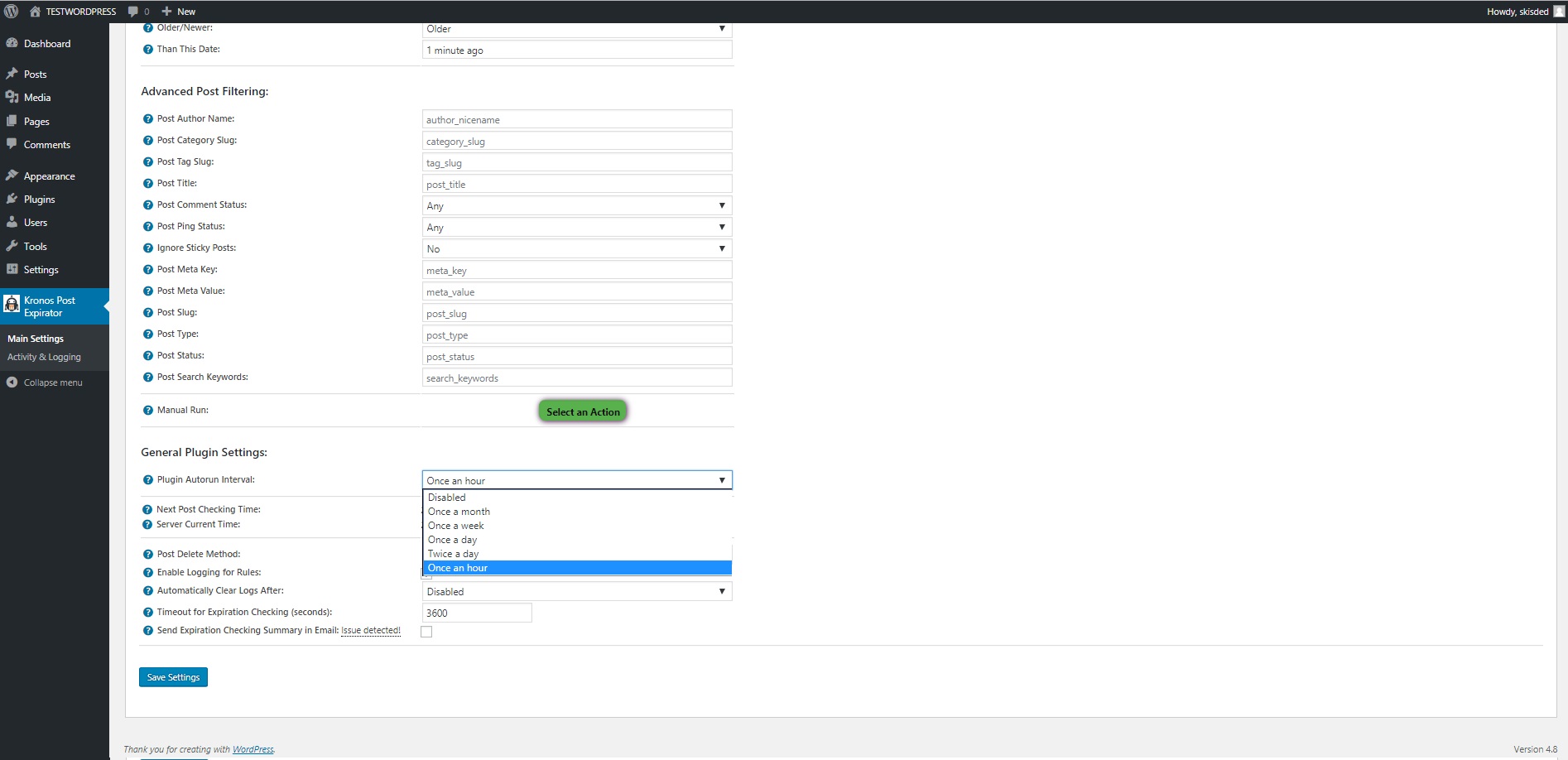
Here you can find the steps needed in configuring your plugin even if you have no HTML knowledge at all. You can find options for:
HINT! Don’t forget to click the Save button every time you modified your settings, otherwise the modifications will be lost!
Main Settings:
- Kronos Automatic Post Expirator Main Switch: Enable or disable the Kronos Automatic Post Expirator. This acts like a main switch.
- Plugin Basic/Advanced Feature Selection: Select if you want to use the basic plugin feature of deleting the posts that are older than X days, or want to go to more sophisticated post filtering and querying.
- Delete Posts Older Than This Number Of Days: Set the number of days, after which posts should expire.
- Older/Newer: Before/after selection. Choose ‘before’ to delete all rules that were created before the given date. Choose ‘after’ to delete all posts that were created after the given date.
- Than This Date: Set before/after when the posts should be deleted. You can define a date in any date format, or even in natural language: last Sunday, first day of last month, etc.Accepted values for this field are listed: here, here, here and here.
- Post Author Name: Input a comma separated list of user_nicenames from which you want to delete posts. To disable this feature, leave this field blank.
- Post Category Slug: Input a comma separated list of category slugs from which you want to delete posts. To disable this feature, leave this field blank.
- Post Tag Slug: Post tag slugs for which you want to query posts. Comma-separated (either), Plus-separated (all).
- Post Title: Post title for which you want to search posts for.
- Post Comment Status: Select the comment status that you want to query posts for.
- Post Ping Status: Select the ping status that you want to query posts for.
- Ignore Sticky Posts: Select if you want to ignore sticky posts or not.
- Post Meta Key: Input a meta key based on which you want to search for posts.
- Post Meta Value: Input a meta value based on which you want to search for posts.
- Post Slug: Input a post slug you want to delete if matching the rest of the constrains.
- Post Type: Input a list of post types you want to query. If you leave this field blank, all post types will be queried. Accepted post types are: post, page, attachment, or any other custom post type you have active on your WordPress installation.
- Post Status: Input a list of post statuses you want to query. If you leave this field blank, all post statuses will be queried. Accepted post statuses are: publish, future, draft, pending, private, trash, auto-draft, inherit or any custom post status you have installed on your WordPress installation.
- Post Search Keywords: Input a search query for posts. Prepending a term with a hyphen will exclude posts matching that term. Eg, ‘pillow -sofa’ will return posts containing ‘pillow’ but not ‘sofa’.
- Manual Run: Rule manual running. Return status codes: green – ok, yellow – no change, red – error occured, check ‘Activity and Logging’ page for info.
- Plugin Autorun Interval: Choose how often you want to automatically check for old posts. This will change the cron scheduling time.
- Automatically Clear Logs After: Choose if you want to automatically clear logs after a period of time.
- Timeout for Expiration Checking (seconds): Set the timeout (in seconds) for every rule running. I recommend that you leave this field at it’s default value (3600).
- Send Expiration Checking Summary in Email: Choose if you want to receive a summary of the rule running in an email.
- Email Address: Input the email adress where you want to send the report. You can input more email addresses, separated by commas.
Activity and Loggind Screen:
- Restore Plugin Default Settings: Hit this button and the plugin settings will be restored to their default values. Warning! All settings will be lost!
- Activity Log: This is the main log of your plugin. Here will be listed every single instance of the rules you run or are automatically run by schedule jobs (if you enable logging, in the plugin configuration).
Summary
Kronos Automatic Post Expirator is a simple, yet powerful tool you can use to create an autoblog with ease. The setup and settings of the plugin couldn’t have been easier. Now, let’s go and enjoy the results of this great plugin! Have fun using it!
Sources and Credits
This component was made by Szabi CodeRevolution, for more information and support contact us at support@coderevolution.ro
Once again, thank you so much for purchasing this item. As I said at the beginning, I’d be glad to help you if you have any questions regarding this plugin and I’ll do my best to assist.