Check Plugin Documentation
Get started quickly with our comprehensive guides
About this plugin
Grammar Matters Automatic Grammar Checker WordPress Plugin is a powerful tool to automatically edit your blog posts.
– This plugin is a great tool to automatically fix grammar for posts and content on your website.
You can define rules to edit posts based on:
- Automatically fix grammar on posts you publish manually
- Automatically check and fix grammar on posts you publish automatically using other plugins (the greatest benefit comes when posts are automatically translated from another language, thus not always grammatically correct)
- Manually check grammar of posts you already published on your site, in bulk
- Manually check anf fix grammar of posts individually (using a button from the post edit screen, in WordPress admin)
- Check and fix grammar on post content and/or title
- Fix spaces and punctuations in posts
WordPress installation
YouTube video tutorial:
I also provided a Quick Install Guide to feature an easy plugin installation for everyone.
To make this plugin work, first, you’ll need to install the plugin. The easiest method is to take the .zip file you’ve downloaded and upload it via Plugins > Add New > Upload Plugin in the WordPress Dashboard. Once the plugin is installed, be sure to Activate it.
Now that you’ve installed and activated the plugin, you’ll see a new menu item created inside WordPress called ‘Grammar Matters’. First thing first, let’s head over to Settings > Grammar Matters and take a look at what options are available.
Plugin Settings
Refreshingly, Grammar Matters Automatic Grammar Checker has a super-simple settings screen. Let’s look at first at the settings panel:
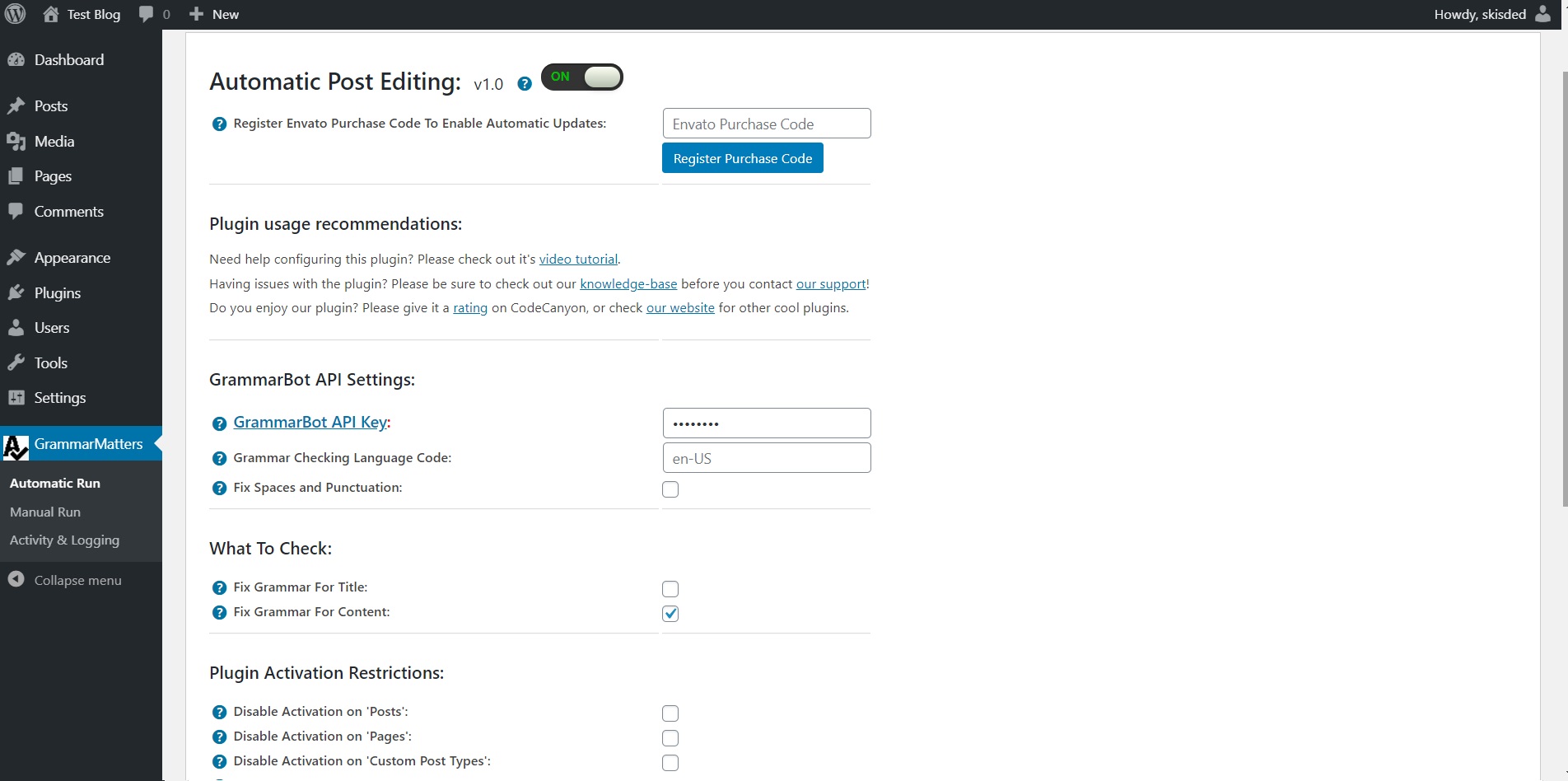
Here you can find the steps needed in configuring your plugin even if you have no HTML knowledge at all. You can find options for:
HINT! Don’t forget to click the Save button every time you modified your settings, otherwise the modifications will be lost!
Automatic Run plugin menu:
- Grammar Matters Automatic Grammar Checker Main Switch: Enable or disable the Grammar Matters Automatic Grammar Checker. This acts like a main switch.
- GrammarBot API Key: Insert your GrammarBot API Key. Get one here.
- Grammar Checking Language Code: Set the language code for grammar checking. Example supported language code (default): en-US
- Fix Spaces and Punctuation: Do you want to fix spaces and punctuation?
- Fix Grammar For Title: Do you want to automatically edit the generated post’s author? You can use the following shortcodes: %%post_author_id%%
- Fix Grammar For Content: Do you want to fix grammar for the post title?
- Post Comment Status: Do you want to fix grammar for the post content?
- Disable Activation on ‘Posts’: Do you want to disable automatic editing of ‘posts’?
- Disable Activation on ‘Pages’: Do you want to disable automatic editing of ‘pages’?
- Disable Activation on ‘Custom Post Types’: Do you want to disable automatic editing of ‘custom post types’?
- Disable Activation on Selected Categories: Do you want to disable plugin activation on selected categories?
- Disable Activation on Selected Tags: Input the tags for which you don’t want to automatically edit the posts. To disable this feature, leave this field blank.
- Delay Post Automatic Editing: Do you want to delay (from publish) automatic post editing by this amount of seconds?
- Enable Logging: Do you want to enable logging?
- Automatically Clear Logs After: Choose if you want to automatically clear logs after a period of time.
Manual Run plugin menu:
- Grammar Matters Automatic Grammar Checker Main Switch: Enable or disable the Grammar Matters Automatic Grammar Checker. This acts like a main switch.
- GrammarBot API Key: Insert your GrammarBot API Key. Get one here.
- Grammar Checking Language Code: Set the language code for grammar checking. Example supported language code (default): en-US
- Fix Spaces and Punctuation: Do you want to fix spaces and punctuation?
- Fix Grammar For Title: Do you want to automatically edit the generated post’s author? You can use the following shortcodes: %%post_author_id%%
- Fix Grammar For Content: Do you want to fix grammar for the post title?
- Author IDs: (int,int,int) – use author id [use minus (-) to exclude authors by ID ex. -1,-2,-3]
- Author Names: (string) – use ‘user_nicename’ (NOT name)
- Category Names: (string,string,string) – use category slugs instead of names.
- Tag Names: (string,string,string) – use tag slugs instead of names.
- Post IDs: (int) – use post id.
- Post Name: (string) – use post slug.
- Page IDs: (int) – use page id.
- Page Name: (string) – use page slug.
- Post Parent: (int) – use page id. Return just the child Pages.
- Post Type: (string,string) – The post types to return. Valid values are: post, page, revision, attachment, other-custom-post-types
- Post Status: (string) – The post status to return. Valid values are: publish, pending, draft, auto-draft, future, private, inherit, trash, other-custom-post-statuses
- Maximum Posts To Change: (int) – number of post to alter. Use ‘posts_per_page’=-1 to alter all posts.
- Search Offset: (int) – number of post to displace or pass over.
- Meta Key Name: (string) – Custom field key.
- Meta Key Value: (string) – Custom field value.
- Search Query: (string) – Passes along the query string variable from a search.
- Year Query: (int) – 4 digit year (e.g. 2011).
- Month Query: (int) – Month number (from 1 to 12).
- Day Query: (int) – Day of the month (from 1 to 31).
- Order Results: (string) – Designates the ascending or descending order of the ‘orderby’ parameter. Defaults to ‘DESC’.
- Order Results By: (string) – Sort retrieved posts by parameter. Defaults to ‘date’.
- Post Comment Status: Do you want to fix grammar for the post content?
- Disable Activation on ‘Posts’: Do you want to disable automatic editing of ‘posts’?
- Disable Activation on ‘Pages’: Do you want to disable automatic editing of ‘pages’?
- Disable Activation on ‘Custom Post Types’: Do you want to disable automatic editing of ‘custom post types’?
- Disable Activation on Selected Categories: Do you want to disable plugin activation on selected categories?
- Disable Activation on Selected Tags: Input the tags for which you don’t want to automatically edit the posts. To disable this feature, leave this field blank.
- Delay Post Automatic Editing: Do you want to delay (from publish) automatic post editing by this amount of seconds?
- Enable Logging: Do you want to enable logging?
- Automatically Clear Logs After: Choose if you want to automatically clear logs after a period of time.
Activity and Logging Screen:
- Restore Plugin Default Settings: Hit this button and the plugin settings will be restored to their default values. Warning! All settings will be lost!
- Activity Log: This is the main log of your plugin. Here will be listed every single instance of the rules you run or are automatically run by schedule jobs (if you enable logging, in the plugin configuration).
Summary
Grammar Matters Automatic Grammar Checker is a simple, yet powerful tool you can use on your website. The setup and settings of the plugin couldn’t have been easier. Now, let’s go and enjoy the results of this great plugin! Have fun using it!
Sources and Credits
This component was made by Szabi CodeRevolution, for more information and support contact us at support@coderevolution.ro
Once again, thank you so much for purchasing this item. As I said at the beginning, I’d be glad to help you if you have any questions regarding this plugin and I’ll do my best to assist.
CodeRevolution