Check Plugin Documentation
Get started quickly with our comprehensive guides
About this plugin
This plugin will allow you to build from scratch an autoblogging system, based on your Buffer account (free or premium).
This plugin will allow you to automatically post to your Buffer account, each time you publish a new post on your blog. Also, existing pages/posts will be able to be posted automatically to Buffer, manually, from post editor page.
Plugin features:
- Post to Buffer queue any post or page, with the push of a button, or automatically, at post publish
- Using Buffer API – no Buffer scraping/crawling
- The plugin offers many configuration options, like the ability to post to the top of the Buffer queue, to post instantly, or to delay posting by an amount of seconds
- detailed plugin activity logging
This plugin requires a Buffer API credentials. How do I get one?
Insert your Buffer Client ID. Learn how to get one here.
WordPress installation
YouTube video tutorial:
I also provided a Quick Install Guide to feature an easy plugin installation for everyone.
To make this plugin work, first, you’ll need to install the plugin. The easiest method is to take the .zip file you’ve downloaded and upload it via Plugins > Add New > Upload Plugin in the WordPress Dashboard. Once the plugin is installed, be sure to Activate it.
Now that you’ve installed and activated the plugin, you’ll see a new menu item created inside WordPress called ‘Bufferomatic Post Generator’. First thing first, let’s head over to Settings > Bufferomatic Post Generator and take a look at what options are available.
Plugin Settings
Refreshingly, Bufferomatic – Auto Post To Buffer has a super-simple settings screen. Let’s look at first at the settings panel:
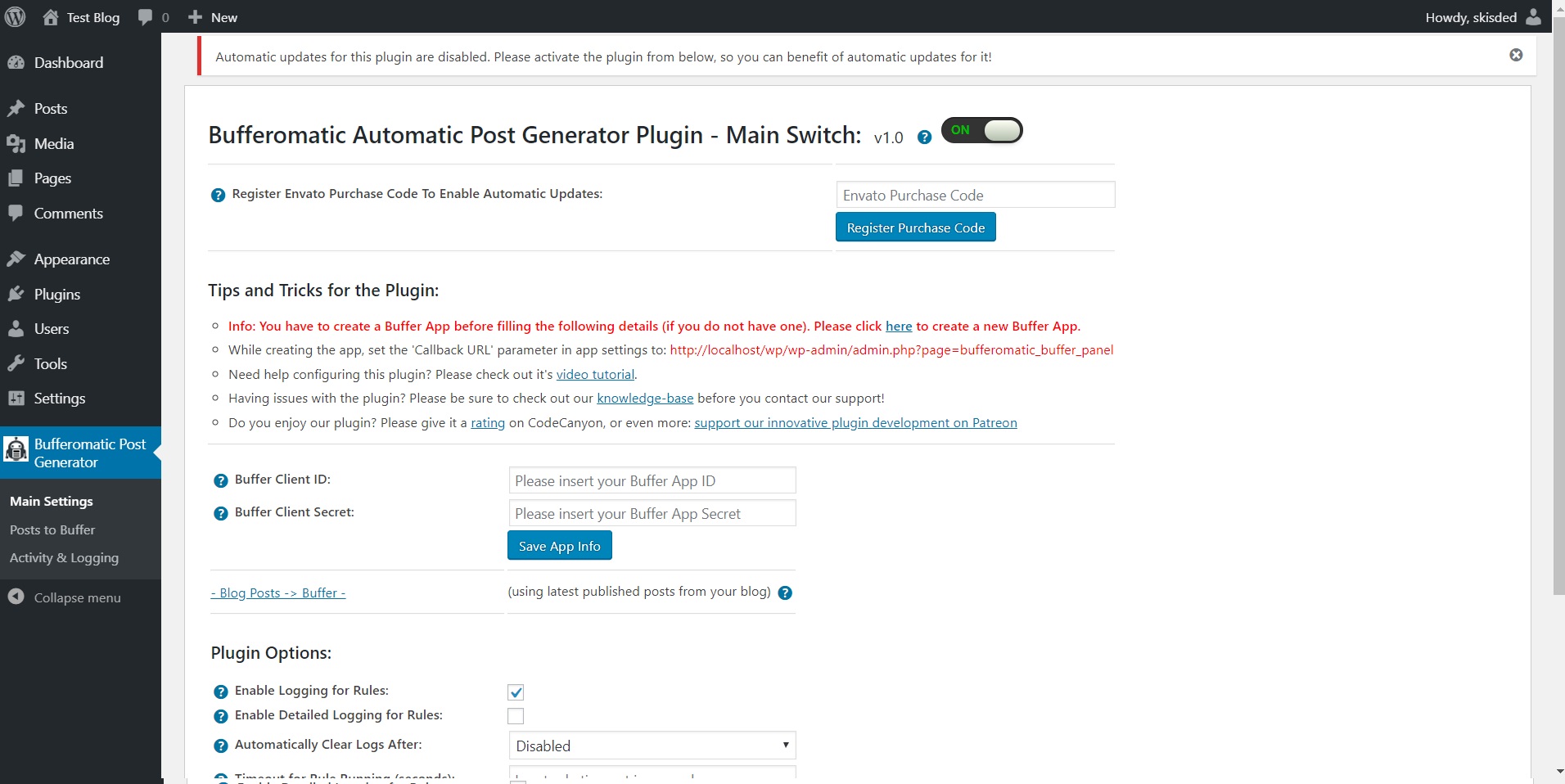
Here you can find the steps needed in configuring your plugin even if you have no HTML knowledge at all. You can find options for:
HINT! Don’t forget to click the Save button every time you modified your settings, otherwise the modifications will be lost!
Main Settings:
- Bufferomatic Automatic Post Generator Plugin – Main Switch: Enable or disable the Bufferomatic – Auto Post To Buffer. This acts like a main switch.
- Buffer Client ID: Insert your Buffer Client ID. Get one here: here.
- Buffer Client Secret: Insert your Buffer Client Secret. After you create your app here: here, you will receive an email with the details of the app. You will find the client secret in the email. Copy it here.
- Enable Logging for Rules: Do you want to enable logging for rules?
- Enable Detailed Logging for Rules: Do you want to enable detailed logging for rules? Note that this will dramatically increase the size of the log this plugin generates.
- Automatically Clear Logs After: Choose if you want to automatically clear logs after a period of time.
- Timeout for Rule Running (seconds): Set the timeout (in seconds) for every rule running. I recommend that you leave this field at it’s default value (3600).
- Shorten Exported URLs To Buffer Using Goo.gl: Choose if you want to cloak URLs with goo.gl link shortener. To lean more about this, please visit this link.
Posts to Buffer Screen:
- Delay Posting By (Seconds): Do you want delay posting with this amount of seconds from post publish? This will create a single cron job for each post (cron is a requirement for this to function). If you leave this field blank, posts will be automatically published on post creation.
- Use Async Posting Method: This option will allow you to select if you want to run posting in async mode. This means that each time you publish a post, the plugin will try to execute it’s task in the background – it will no longer block new post posting, while it finishes it’s job.
- Post Only Images: Do you want to post only images to Buffer?
- Social Network Pages Where to Publish Posts: Select the pages associated with your App ID, where you want to publish your posts. To select multiple entries, please hold down the ‘Control’ key.
- Maximum Post Count Per Time Interval: Set the maximum number of posts to be submitted each predefined time interval (default is 1 hour, you can change this in the ‘Maximum Post Count Interval’ settings from below. To disable this feature, leave this field blank.
- Maximum Post Count Interval (Minutes): Set the maximum number of posts to be submitted each predefined time interval.
- Buffer Post Description Template: Choose the template of your Buffer posts. You can use the following shortcodes: %%variable_content%%, %%featured_image%%, %%post_cats%%, %%post_tags%%, %%blog_title%%, %%author_name%%, %%post_link%%, %%random_sentence%%, %%random_sentence2%%, %%post_title%%, %%post_content%%, %post_excerpt%%
- Buffer Media Attachment Title Template: Choose the template of your Buffer media attachment’s title. You can use the following shortcodes: %%variable_content%%, %%featured_image%%, %%post_cats%%, %%post_tags%%, %%blog_title%%, %%author_name%%, %%post_link%%, %%random_sentence%%, %%random_sentence2%%, %%post_title%%, %%post_content%%, %post_excerpt%%
- Buffer Media Attachment Description Template: Choose the template of your Buffer media attachment’s description. You can use the following shortcodes: %%variable_content%%, %%featured_image%%, %%post_cats%%, %%post_tags%%, %%blog_title%%, %%author_name%%, %%post_link%%, %%random_sentence%%, %%random_sentence2%%, %%post_title%%, %%post_content%%, %post_excerpt%%
- Disable Automatic Link Shortening: Do you want to disable automatic link shortening of links inside posts?
- Post Updates Instantly: Do you want to post updates instantly?
- Add To The Top Of Buffer Queue: Do you want to add updates to the top of Beffer queues?
- Create Text Only Post: Do you want to create text only posts?
- Publish Update At This Time: Select when to instruct Buffer to publish the submitted updates. Overrides the Top and Instant publishing parameters from above. You can enter any date, in natural language, or you can also use relative dates to the time of posting, like: +3 hours.
- Import Media From Posted Links: Do you want to import media from posted links?
- Disable Autoposting of ‘Posts’: Do you want to disable automatically posting of WordPress ‘posts’ to Buffer?
- Disable Autoposting of ‘Pages’: Do you want to disable automatically posting of WordPress ‘pages’ to Buffer?
- Disable Autoposting of ‘Custom Post Types’: Do you want to disable automatically posting of WordPress ‘pages’ to Buffer?
- Disable Autoposting of Selected Categories: Do you want to disable automatically posting of WordPress ‘posts’ to Buffer?
- Disable Autoposting of Selected Tags: Input the tags for which you want to disable posting. You can enter more tags, separated by comma. Ex: cars, vehicles, red, luxury. To disable this feature, leave this field blank.
- %%variable_content%% Shortcode Content: Set the %%variable_content%% shortcode content.
- %%variable_content%% Shortcode Occurance Rate: Set the occurance rate of the %%variable_content%% shortcode. In this percentage, the shortcode will be filled with content and posted.
Activity and Logging Screen:
- Restore Plugin Default Settings: Hit this button and the plugin settings will be restored to their default values. Warning! All settings will be lost!
- Activity Log: This is the main log of your plugin. Here will be listed every single instance of the rules you run or are automatically run by schedule jobs (if you enable logging, in the plugin configuration).
How to customize resulting posts with built in shortcodes?
You can use the following shortcodes in post title and content editing:
-
%%post_title%%, %%post_content%%, %post_excerpt%%
- %%variable_content%% – create variable content
- %%featured_image%% – the featured image link of the post
- %%post_cats%% – the categories of the post
- %%post_tags%% – the tags of the post
- %%blog_title%% – the title of the blog
- %%author_name%% – the author name of the post
- %%post_link%% – the link of the post
- %%post_title%% – the title of the post
- %%post_content%% – the content of the post
- %%post_excerpt%% – the excerpt of the post
Summary
Bufferomatic – Auto Post To Buffer is a simple, yet powerful tool you can use to create an autoblog with ease. The setup and settings of the plugin couldn’t have been easier. Now, let’s go and enjoy the results of this great plugin! Have fun using it!
Sources and Credits
This component was made by Szabi CodeRevolution, for more information and support contact us at support@coderevolution.ro
Once again, thank you so much for purchasing this item. As I said at the beginning, I’d be glad to help you if you have any questions regarding this plugin and I’ll do my best to assist.
CodeRevolution