Check Plugin Documentation
Get started quickly with our comprehensive guides
About this plugin
AutoBlog Iframe Extension WordPress Plugin is a powerful tool to put your autoblogging efforts to the next level.
– It will use iframes to automatically embed original article posts to your site!
The goal is to achieve the following:
AutoBlog Iframe Extension will automatically create content for your site, using iframes to embed the original content automatically to your site. Iframes are really loved by Google, because they are categorized as “fair use” of the original content – thus your site will not get any duplicate content SEO penalties.
Why do you need iFrames on your site?
To truly answer this question, we first need to know what an iframe is.
iFrames allow you to embed a separate HTML documents (from other websites) on the pages from your site. As a result, you will automatically get content from other URLs on your own web page.
Search engines love iframes, because they are used in many situations on the web. Here are some examples:
- Built-in videos, presentations and other visual content.
- For embedding examples of code fragments.
- To optimize the appearance of support service tools.
- To generate background traffic through affiliate programs. The use of the tag is due to the increase of visits that are recorded by analytics systems and overstate traffic results.
- Used in software applications.
- Often helpful for technical support departments.
Do iframes cause duplicate content issues?
Since iframes reference a different web page, rather than replicating the content, they will not create duplicate content penalties from search engines. The crawling robots recognize the <iframe> tag and don’t register the content as duplicate.
Does Google consider iframes as “Cloaking”?
“Cloaking” refers to a black hat tactic in which you present different content to search engine robots than to users who visit your page.
Since iframes clearly mark the source of the content in the HTML syntax, search engine robots understand that the content the user sees is the same content referred to in the source URL. Iframes are therefore completely distinct from cloaking, so don’t worry about being carded for black hat tactics.
WordPress installation
YouTube video tutorial:
I also provided a Quick Install Guide to feature an easy plugin installation for everyone.
To make this plugin work, first, you’ll need to install the plugin. The easiest method is to take the .zip file you’ve downloaded and upload it via Plugins > Add New > Upload Plugin in the WordPress Dashboard. Once the plugin is installed, be sure to Activate it.
Now that you’ve installed and activated the plugin, you’ll see a new menu item created inside WordPress called ‘AutoBlog Iframe Extension’. First thing first, let’s head over to Settings > AutoBlog Iframe Extension and take a look at what options are available.
Plugin Settings
Refreshingly, AutoBlog Iframe Extension has a super-simple settings screen. Let’s look at first at the settings panel:
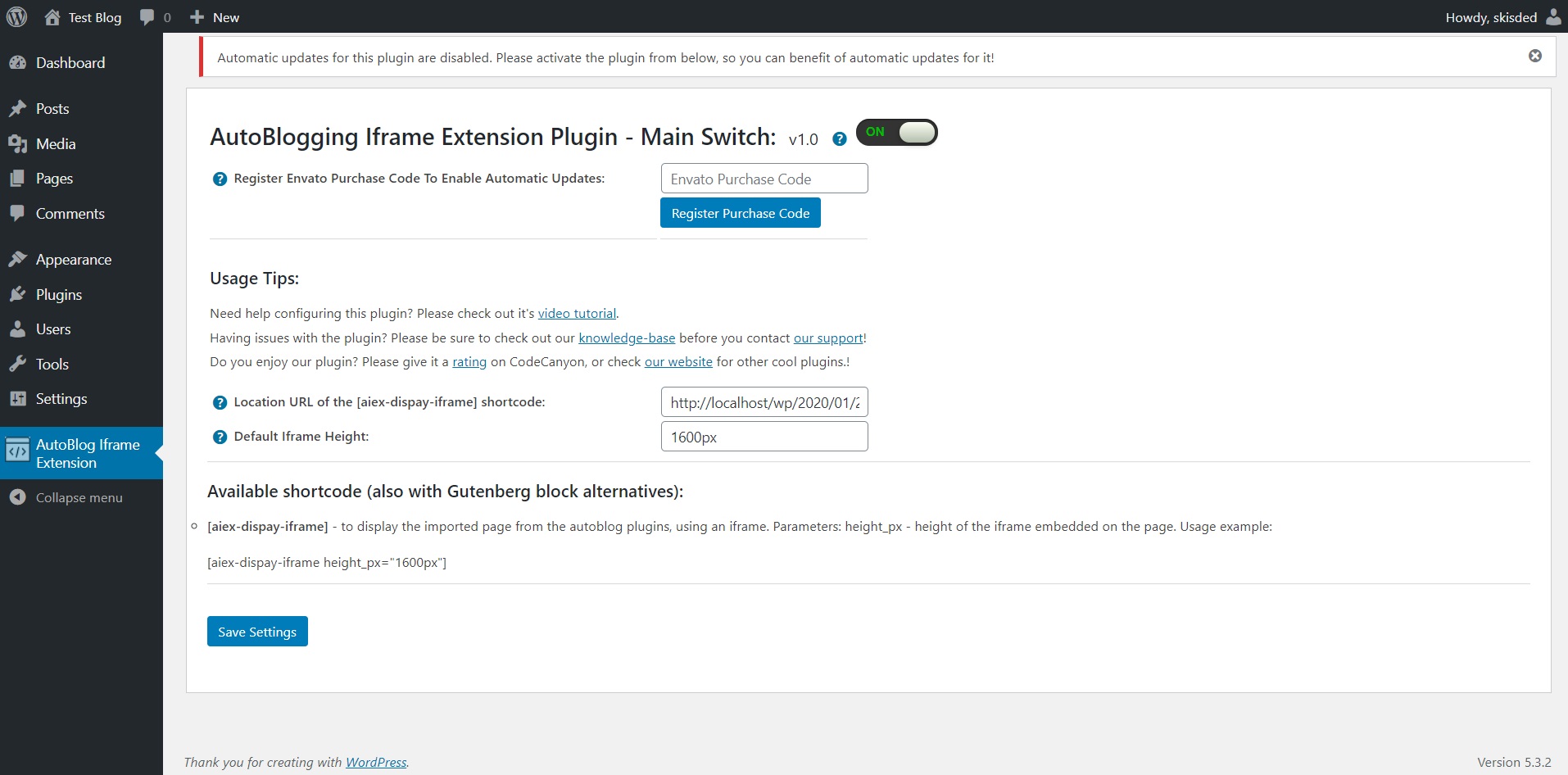
Main Settings:
- AutoBlogging Iframe Extension Plugin – Main Switch: Enable or disable this plugin. This acts like a main switch.
- Location URL of the [aiex-dispay-iframe] shortcode: Select the location URL of the [aiex-dispay-iframe] shortcode, where the plugin will redirect all posts which were generated by autoblogging plugins, and the source URL will be displayed there in an iframe. This settings field is required for the plugin to work.
- Default Iframe Height:Set the default iframe height for the [aiex-dispay-iframe] shortcode
Here you can find the steps needed in configuring your plugin even if you have no HTML knowledge at all.
HINT! Don’t forget to click the Save button every time you modified your settings, otherwise the modifications will be lost!
Available shortcode (this shortcode will be available also in Gutenberg editor, as a Gutenberg block, in the ‘Embeds’ blocks section:
- [aiex-dispay-iframe] – add this shortcode to the page or post where you wish to display the iframe on your site. You will need to add the URL of this page or post, in plugin settings, in the ‘Location URL of the [aiex-dispay-iframe] shortcode’ settings field.
Summary
AutoBlog Iframe Extension is a simple, yet powerful tool you can use to create an autoblog with ease, which will not be penalized by duplicated content issues. The setup and settings of the plugin couldn’t have been easier. Now, let’s go and enjoy the results of this great plugin! Have fun using it!
Sources and Credits
This component was made by Szabi CodeRevolution, for more information and support contact us at support@coderevolution.ro
Once again, thank you so much for purchasing this item. As I said at the beginning, I’d be glad to help you if you have any questions regarding this plugin and I’ll do my best to assist.
CodeRevolution