Check Plugin Documentation
Get started quickly with our comprehensive guides
About this plugin
Aether Content Hider WordPress Plugin is a powerful content hider plugin.
– It will use shortcodes to hide or display the content you define, to fit your needs!
The goal is to achieve the following:
Aether Content Hider will hide content on your blog, based on the rules you define in it’s shortcodes.
Some usage examples:
- show/hide content by date or time – ex: show content until 10/12/2017
- show/hide content by date or time repeatedly – ex: show content between 9 AM and 5 PM, from Monday until Friday, each week
- show/hide content by user login status – ex: show content only to logged in users
- show/hide content by user device type – ex: show content only to users that are not on a mobile device
- show/hide content if user commented on the current post – ex: show content only if current user has commented on the current post (you can define minimum/maximum comment lenght + activate comment spam filter
WordPress installation
Youtube video tutorial:
I also provided a Quick Install Guide to feature an easy plugin installation for everyone.
To make this plugin work, first, you’ll need to install the plugin. The easiest method is to take the .zip file you’ve downloaded and upload it via Plugins > Add New > Upload Plugin in the WordPress Dashboard. Once the plugin is installed, be sure to Activate it.
Now that you’ve installed and activated the plugin, you’ll see a new menu item created inside WordPress called ‘Aether Content Hider’. First thing first, let’s head over to Settings > Aether Content Hider and take a look at what options are available.
Plugin Settings
Refreshingly, Aether Content Hider has a super-simple settings screen. Let’s look at first at the settings panel:
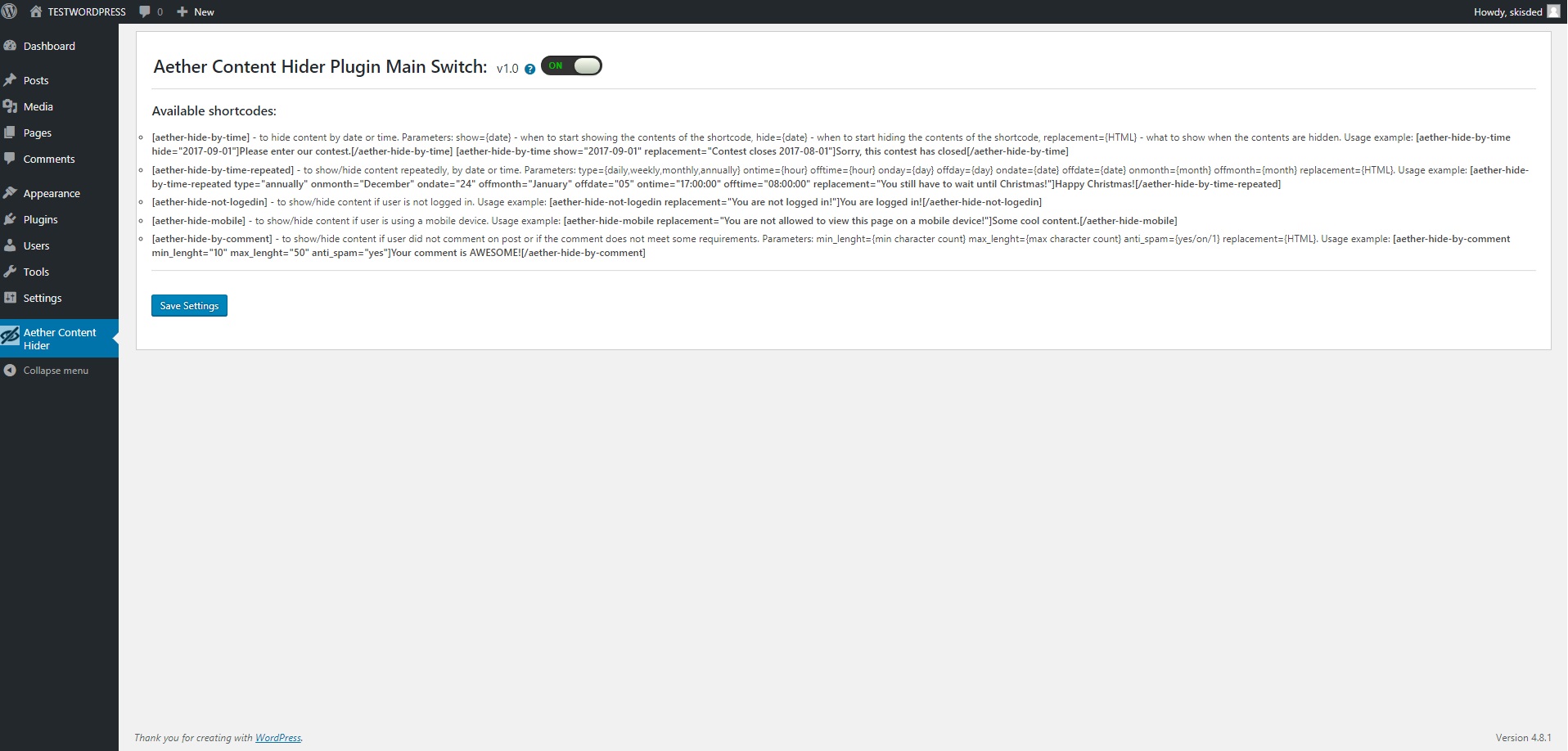
Here you can find the steps needed in configuring your plugin even if you have no HTML knowledge at all. You can find options for:
HINT! Don’t forget to click the Save button every time you modified your settings, otherwise the modifications will be lost!
Available shortcodes (these shortcodes will be available also in the edit post screeen (C,L,T,R,M letters – one for each shortcode):
- [aether-hide-by-time] – to hide content by date or time. Parameters: show={date} – when to start showing the contents of the shortcode, hide={date} – when to start hiding the contents of the shortcode, replacement={HTML} – what to show when the contents are hidden. Usage example: [aether-hide-by-time hide=”2017-09-01″]Please enter our contest.[/aether-hide-by-time] [aether-hide-by-time show=”2017-09-01″ replacement=”Contest closes 2017-08-01″]Sorry, this contest has closed[/aether-hide-by-time]
- [aether-hide-by-time-repeated] – to show/hide content repeatedly, by date or time. Parameters: type={daily,weekly,monthly,annually} ontime={hour} offtime={hour} onday={day} offday={day} ondate={date} offdate={date} onmonth={month} offmonth={month} replacement={HTML}. Usage example: [aether-hide-by-time-repeated type=”annually” onmonth=”December” ondate=”24″ offmonth=”January” offdate=”05″ ontime=”17:00:00″ offtime=”08:00:00″ replacement=”You still have to wait until Christmas!”]Happy Christmas![/aether-hide-by-time-repeated]
- [aether-hide-not-logedin] – to show/hide content if user is not logged in. Usage example: [aether-hide-not-logedin replacement=”You are not logged in!”]You are logged in![/aether-hide-not-logedin]
- [aether-hide-mobile] – to show/hide content if user is using a mobile device. Usage example: [aether-hide-mobile replacement=”You are not allowed to view this page on a mobile device!”]Some cool content.[/aether-hide-mobile]
- [aether-hide-by-comment] – to show/hide content if user did not comment on post or if the comment does not meet some requirements. Parameters: min_lenght={min character count} max_lenght={max character count} anti_spam={yes/on/1} replacement={HTML}. Usage example: [aether-hide-by-comment min_lenght=”10″ max_lenght=”50″ anti_spam=”yes”]Your comment is AWESOME![/aether-hide-by-comment]
Summary
Aether Content Hider is a simple, yet powerful tool you can use to create an autoblog with ease. The setup and settings of the plugin couldn’t have been easier. Now, let’s go and enjoy the results of this great plugin! Have fun using it!
Sources and Credits
This component was made by Szabi CodeRevolution, for more information and support contact us at support@coderevolution.ro
Once again, thank you so much for purchasing this item. As I said at the beginning, I’d be glad to help you if you have any questions regarding this plugin and I’ll do my best to assist.
CodeRevolution